About this app
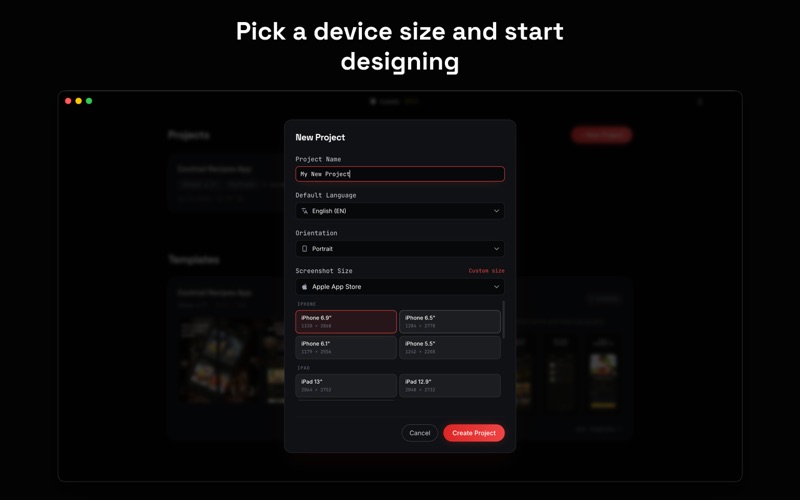
Lomio is the fastest way to create professional store listing screenshots for your app. Drag your screenshots onto the canvas, place them inside real device frames, add text and graphics, and export polished App Store and Play Store screenshots in minutes. INTUITIVE DRAG AND DROP EDITOR Lomio works differently from traditional design tools. Instead of juggling complex artboards, you work on one canvas with predefined screenshot areas side by side. Drag images, text, shapes, and device frames onto the canvas. Elements can overlap across multiple screenshots, so you can create seamless layouts where text flows across slides or a device spans two screenshots. Only the marked screenshot areas are exported for pixel-perfect results. POP-OUT HIGHLIGHTS Highlight important parts of your app with pop-outs. Select an area of your screenshot and turn it into a zoomed or emphasized detail view. Adjust the size and position directly on the canvas. Pop-outs also work with localization: define them once, and when you replace the screenshot for another language, the pop-out stays correctly positioned because it is relative to the screenshot size. OFFICIAL DEVICE FRAMES Choose from 15+ real Apple device bezels including iPhone, iPad, and more, each available in multiple colors. Drop your app screenshot into a frame and Lomio automatically crops and masks it to fit perfectly. TEMPLATES TO GET YOU STARTED Start with professionally designed templates instead of a blank canvas. Templates include text, device frames, and backgrounds already arranged for you. Replace the screenshots, edit the text, tweak the colors, and export a full set of store screenshots in no time. You can also import and export templates as .lomio files to reuse or share. More templates are coming soon. MULTI-LANGUAGE SUPPORT Create screenshots in multiple languages without duplicating your work. Add as many languages as you want and define translations for each translatable element. This currently includes text and device screenshots inside frames. Switch languages with one click and the canvas updates instantly. A translation status indicator helps you track what is complete. BUILT-IN ASSET LIBRARY Access thousands of assets directly inside the editor. Browse icons from Lucide, illustrations from unDraw, and brand icons from Simple Icons. Search, recolor, and place them on your canvas in seconds. You can also search millions of free stock photos from Pexels without leaving the app. ALL DEVICE SIZES INCLUDED Lomio supports screenshot sizes for the App Store and other major stores, including iPhone, iPad, Mac, Apple Watch, Apple TV, Android phones, tablets, Chromebooks, Wear OS, Android TV, and Android Automotive. Select your target device and Lomio sets up the correct dimensions automatically. POWERFUL DESIGN TOOLS Use any font installed on your Mac. Add shapes like rectangles, circles, stars, arrows, and blobs. Apply gradients, borders, shadows, and opacity. Resize, rotate, layer, and align elements with precision. Undo and redo up to 50 steps, with auto-save every 5 seconds. EXPORT AND PREVIEW Export all screenshots at full resolution as JPG files, ready for App Store Connect and other stores. WORKS OFFLINE Lomio runs entirely on your Mac. Your projects stay local and the editor works offline. Only Pexels image search requires an internet connection. Create better app screenshots faster with Lomio. Lomio Pro unlocks additional premium features and content. Available purchase options: • Monthly: $4.99 a month • Yearly: $29.99 a year • Lifetime: $79.99 one-time purchase A free trial may be available for new subscribers. Payment will be charged to your Apple ID account at confirmation of purchase. Subscriptions automatically renew unless cancelled at least 24 hours before the end of the current period. You can manage and cancel subscriptions in your Apple ID account settings. Privacy Policy: https://lomio.io/privacy Terms of Use: https://lomio.io/terms
Latest release
What’s New
This update introduces a new Pop-Out feature, allowing you to highlight specific areas of your screenshots more easily. It’s great for emphasizing important app features in your store listings. We also included several bug fixes and general improvements to make the app more stable and smoother to use.
Audience growth
Ratings growth
Baseline captured. Growth appears after the crawler observes a changed rating count.
Momentum comes from crawler snapshots for the tracked storefront. “Viral growth signal” means unusually fast recent rating gains; it is an indicator, not download data.
Price tracking
Price intelligence
First snapshot captured. The trend line starts after the next crawler price observation.
- First observed Oct 13, 2026 · 2:22 PM Free
Screenshots