About this app
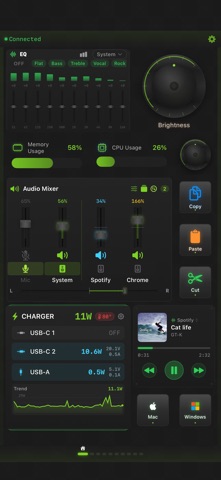
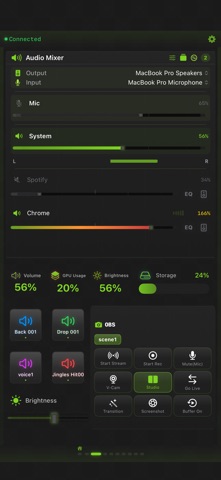
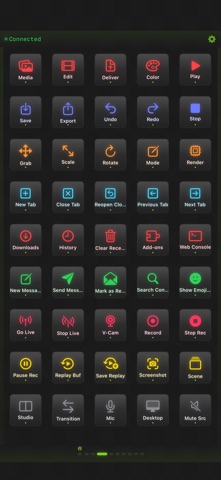
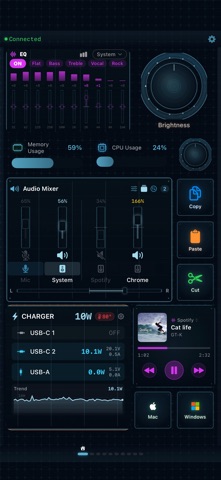
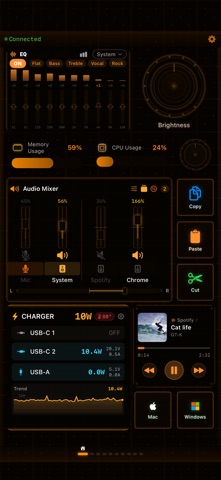
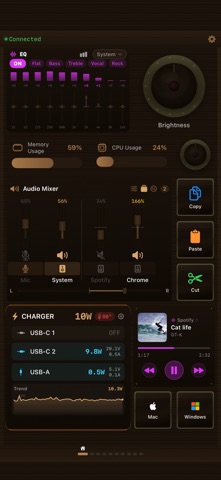
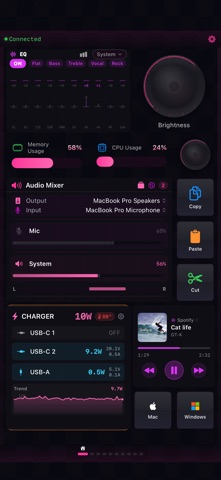
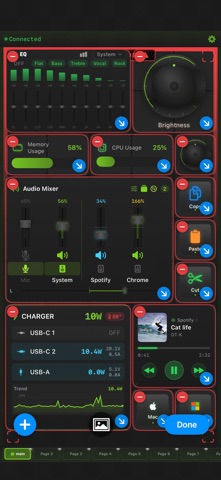
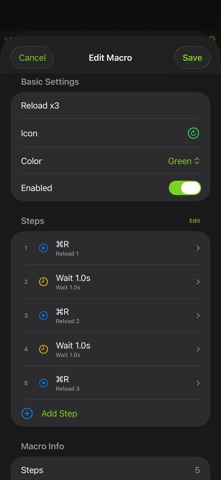
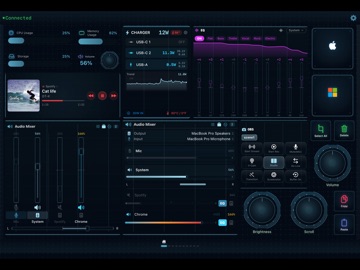
StreamPad — Transform your iPhone or iPad into a professional-grade control surface. Buttons, dials, sliders, gauges, sound pads, music widgets — 10+ widget types on a free-form grid. 890+ ready-to-use shortcuts for 40 pro apps across macOS and Windows. Streamer, editor, DJ, musician, developer — one tap, one twist, one slide is all it takes. ■ Pro Audio Mixer — Built In No extra hardware needed. Control each app's volume independently, from silent to 200% overdrive. Mute or boost any source in real time. Switch output devices on the fly. Adjust L/R stereo balance per channel. 10-band graphic EQ (31 Hz–16 kHz) with real-time spectrum analyzer and 6 presets (Flat / Bass / Treble / Vocal / Rock / Electro). Save your entire audio setup — volumes, EQ, device routing — with Quick Config. A mixer that rivals standalone apps — built right in. ■ 40 App Presets — 890+ Shortcuts, Zero Setup Shortcut packs for 40 pro apps across macOS and Windows, in 7 categories — just pick an app, no manual setup. • Video — Final Cut Pro, Premiere Pro, DaVinci Resolve, After Effects, OBS • Design — Photoshop, Lightroom, Blender • Music — Logic Pro, Ableton Live, Spotify, Apple Music • Browser — Safari, Chrome, Firefox • Comms — Discord, Zoom, Teams, Slack, Messages • Dev — VS Code, Xcode, Terminal • Productivity — Mail, Notes, Reminders, Photos, Finder, and more ■ Adaptive Grid — Up to 150+ Items Per Page Auto-adapts to your screen's pixel density. Place any-size widgets — 1×1 buttons, 2×2 dials, 4×1 sliders — wherever you want. Up to 10 pages for 1,000+ total controls. Your layout, your rules. * Capacity varies by device and screen size. ■ 13 Action Types Keyboard shortcuts, text input, app launch, URL, system control (volume / brightness / media), OBS commands, music control, sound board, macros, Apple Shortcuts, Webhook (GET/POST/PUT/DELETE), and more. ■ OBS Studio — 26 Commands Full WebSocket v4/v5 support. Scenes, streaming, recording, virtual cam, source visibility, filters, replay buffer, captions, chapter markers — all one tap. ■ Macro Automation Record keystrokes, add delays and loops, replay complex workflows with one tap. Turn repetitive tasks into one-button operations. ■ Sound Board Trigger audio clips instantly. Switch between local preview and Mac/Windows playback. Perfect for streams, calls, and presentations. ■ Dials & Touch Strips Rotary dials for volume, brightness, scroll, zoom — precise, tactile control. Touch strips switch between slider and Touch Bar modes. Vertical and horizontal supported. ■ System Monitor Live CPU, memory, GPU, storage, volume, brightness. 5 styles: circular, semicircle, linear, compact, vertical bar. ■ Music Widget Apple Music, Spotify, Chrome (YouTube). Track, artist, album art, position — view and control in one place. ■ 18 Designer Themes Cyberpunk, Neon, Retro, Wood, Nixie Tube, Ice, DJ, and more. Rich themes with hand-crafted SVG assets for every widget. ■ Profiles & Auto-Switch Group settings into profiles. Auto-switch based on Mac's active app. ■ Folders & Custom Images Organize into folders. Set any photo as an icon. ■ Shortcuts & Webhook Run macOS Shortcuts. HTTP requests for smart home and services. ■ Free Companion App macOS/Windows Companion for shortcuts, audio mixing, OBS, and monitoring. Wi-Fi auto-discovery + USB for zero-latency control. ■ English / Japanese —————————— [Free] • 3 themes • 2 pages / 10 items • 1 profile • 3 macros • 3 sounds • Ads [Remove Ads — IAP] • Ad-free [StreamPad Pro — IAP] • All 18 themes • Unlimited pages, items, profiles + auto-switch • Pro Audio Mixer — per-app volume, 200% overdrive, EQ & spectrum • 40 presets / 890+ shortcuts • Unlimited macros & sound board • Folders, custom images, Shortcuts, Webhook • Power Monitor (Anker BLE) • Quick Config • Ad-free
Latest release
What’s New
v1.3.1 - Output Groups, your way Output Groups let you play to multiple speakers/headphones at once — now you can control volume and mute for each device individually. 【What's Improved】 ■ Per-device Volume (Pro) Adjust the volume of each device in an output group independently — from the mixer, touch strip, or volume gauge. When a group is the output, the UI automatically switches to per-device sliders. ■ Per-device Mute (Pro) Mute/unmute each device in a group while keeping its volume intact. Silence just one speaker, instantly. 【Important】 ・Requires Mac Companion v1.3.1 or later (free) Download: https://streampad-app.github.io/streampad-web/ ・Output Groups are macOS Companion only. 【Other】 ・UI stability improvements
Audience growth
Ratings growth
Baseline captured. Growth appears after the crawler observes a changed rating count.
Momentum comes from crawler snapshots for the tracked storefront. “Viral growth signal” means unusually fast recent rating gains; it is an indicator, not download data.
Price tracking
Price intelligence
First snapshot captured. The trend line starts after the next crawler price observation.
- First observed Sep 6, 2026 · 1:12 PM Free
Screenshots