About this app
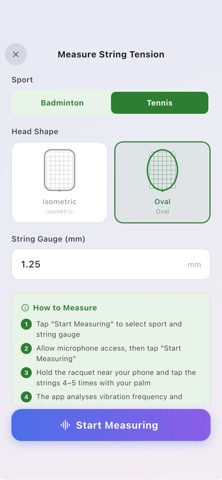
String Tension Meter helps tennis and badminton players measure racquet string tension quickly and accurately using only an iPhone. By analyzing string vibration through your device's microphone, the app provides instant tension readings in both lbs and kg without requiring any external hardware. It also includes advanced racquet management tools. Whether you're a competitive player, coach, stringer, or recreational athlete, String Tension Meter makes it easy to track racquet performance and know when it's time to restring. FEATURES • Measure string tension in seconds using your iPhone microphone • Instant racquet tension readings in lbs and kg • Supports both tennis and badminton racquets • Works with all common string materials and gauges • No external string meter or hardware required • Save and organize measurements by racquet profile • Track tension changes over time with measurement history • Store and manage multiple racquets and string setups • Archive previous string jobs and restore them anytime • Share tension measurement results with others HOW IT WORKS Select your sport and string information Hold the racquet near your iPhone Tap the string bed a few times The app analyzes vibration frequency Receive an instant string tension measurement RACQUET MANAGEMENT Keep detailed records of every racquet and string setup. Save reference tensions, monitor tension loss, review historical measurements, and compare performance across different string jobs. Everything stays organized in one place so you can make informed restringing decisions. PERFECT FOR • Tennis players • Badminton players • Racquet technicians and stringers • Coaches and academies • Competitive athletes tracking equipment performance String Tension Meter combines acoustic analysis, racquet management, and tension tracking in one easy-to-use app. Download today and take control of your string tension with a smarter way to measure and monitor racquet performance. Terms of Use (EULA): https://www.apple.com/legal/internet-services/itunes/dev/stdeula/
Audience growth
Ratings growth
Baseline captured. Growth appears after the crawler observes a changed rating count.
Momentum comes from crawler snapshots for the tracked storefront. “Viral growth signal” means unusually fast recent rating gains; it is an indicator, not download data.
Price tracking
Price intelligence
First snapshot captured. The trend line starts after the next crawler price observation.
- First observed Aug 21, 2026 · 9:04 PM Free
Screenshots