About this app
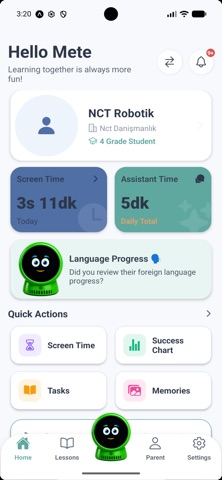
StudentOrbit is an innovative parental control and tracking app designed to help you monitor your child's educational journey with a modern approach. Seamlessly integrated with Orbit smart educational robots, this app allows you to oversee your child's digital and physical learning experiences as if you were right next to them. With support for multiple student profiles, you can securely manage the educational data of all your children from a single hub. StudentOrbit goes beyond simple screen time tracking; it allows you to deeply analyze which subjects your child is spending time on and how they interact with the AI-powered assistant. Key Features: Smart Robot Integration: Easily pair the app with your child's smart robot using a quick QR code scan. Monitor the robot's battery level, online status, and last seen time in real-time. Screen Time & Assistant Analytics: View daily and weekly easy-to-read charts detailing how much time your child spends on the device or with the robot. Track not only total screen time but also specific interaction time with the dedicated AI assistant. Lesson & Progress Tracking: Monitor progress in English reading, speaking practices, and other core subjects. See where your child focuses their time the most and help guide their educational development. Homework & Task Management: Check assigned tasks and homework completion statuses. Never miss a single detail in your child's educational process. Multi-Profile Support: Add multiple children from your family into the same app, managing each child's educational progress and paired robot individually. Switch between profiles effortlessly with just a single tap. Real-Time Notifications: Receive instant alerts and daily summaries about your child's progress and important updates. Let your child learn safely through interactive play while you enjoy complete peace of mind. Step into the future of innovative and smart parenting with StudentOrbit today!
Latest release
What’s New
• Added the ability to view and cancel pending teacher invitation requests. • Improved teacher invitation flow and error messaging. • Enhanced reminder creation and editing with smart date and time auto-adjustments. • Performance improvements and general bug fixes.
Audience growth
Ratings growth
Baseline captured. Growth appears after the crawler observes a changed rating count.
Momentum comes from crawler snapshots for the tracked storefront. “Viral growth signal” means unusually fast recent rating gains; it is an indicator, not download data.
Price tracking
Price intelligence
First snapshot captured. The trend line starts after the next crawler price observation.
- First observed Aug 24, 2026 · 12:13 AM Free
Screenshots