About this app
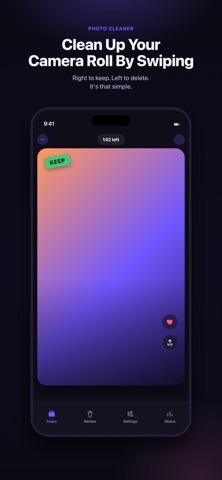
Clear out your camera roll the fast way. Swipe left to delete, swipe right to keep. Board on hour long flight? swipeClean is a quick, satisfying way for photo cleanup. No more select photos one by one only to mass up then redo again, when swipeClean you can just swipe through your library one photo at a time and watch your storage come back. FAST, EASY CLEANUP • Swipe left to mark a photo for deletion, right to keep it • Fly through hundreds of photos in minutes • Undo any swipe instantly if you change your mind SAFE BY DESIGN • Nothing is deleted until you say so — review your full "marked for deletion" batch in a grid first • Restore individual photos before confirming • Final delete goes through Apple's own system confirmation, so you're always in control SMART SWIPE RULES • Auto skip your favourites • Auto skip screenshots • Auto skip videos Customize exactly what shows up in your deck, right from Settings. BROWSE BY ALBUM Clean up a specific album or date range instead of your whole library — perfect for tackling one event, one trip, or one bloated folder at a time. PRIVACY FIRST Your photos never leave your device. swipclean only asks for the Photos permission it needs to show and manage your library Stop scrolling, Start swiping.
Latest release
What’s New
UI tweak
Audience growth
Ratings growth
Baseline captured. Growth appears after the crawler observes a changed rating count.
Momentum comes from crawler snapshots for the tracked storefront. “Viral growth signal” means unusually fast recent rating gains; it is an indicator, not download data.
Price tracking
Price intelligence
First snapshot captured. The trend line starts after the next crawler price observation.
- First observed Sep 14, 2026 · 8:28 AM Free
Screenshots