About this app
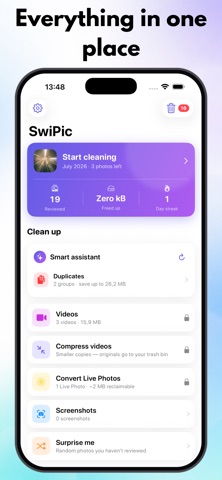
Your photo library is full — of duplicates, blurry shots, and screenshots you'll never look at again. SwiPic turns cleaning up into something you'll actually enjoy: swipe right to keep, swipe left to delete. Month by month, minute by minute. HOW IT WORKS • Swipe through your photos month by month — right keeps, left deletes • Nothing is deleted right away: everything lands in SwiPic's trash bin first • You confirm every deletion, and iOS keeps deleted photos recoverable for 30 days • Not sure? Bookmark a photo and decide later SMART ASSISTANT — 100% ON-DEVICE • Finds duplicates and similar shots automatically • Detects blurry photos • Sorts your library into smart albums (pets, food, nature, and more) • All analysis runs on your iPhone. No cloud, no uploads, no tracking — the App Store label says it best: Data Not Collected. MORE TOOLS • See exactly how much space you free up — in real numbers • Compress oversized videos to storage-friendly 1080p HEVC • Convert Live Photos to stills and reclaim the hidden video space • Relive memories with On This Day, and keep your streak going with the home screen widget SWIPIC PRO The daily free allowance covers casual tidying. Pro unlocks: • Unlimited swipes — no daily limit • Video compression and Live Photo conversion • One-tap cleanup of all duplicates Choose a monthly or yearly subscription (with a 7-day free trial) or a one-time Lifetime purchase — you'll see the exact price in the app before you buy. All Pro options support Family Sharing. Subscriptions renew automatically unless cancelled at least 24 hours before the end of the current period. Manage or cancel anytime in your App Store account settings. The free trial converts into a yearly subscription unless cancelled before it ends. Privacy Policy: https://progressosupport.github.io/SwiPic/privacy Terms of Use (EULA): https://www.apple.com/legal/internet-services/itunes/dev/stdeula/
Latest release
What’s New
The daily limit now explains itself: when your free decisions are used up, SwiPic shows you that new ones arrive at midnight — and how your day streak earns up to +25 extra. Plus refined translations and small improvements.
Audience growth
Ratings growth
Baseline captured. Growth appears after the crawler observes a changed rating count.
Momentum comes from crawler snapshots for the tracked storefront. “Viral growth signal” means unusually fast recent rating gains; it is an indicator, not download data.
Price tracking
Price intelligence
First snapshot captured. The trend line starts after the next crawler price observation.
- First observed Aug 19, 2026 · 4:21 PM Free
Screenshots