About this app
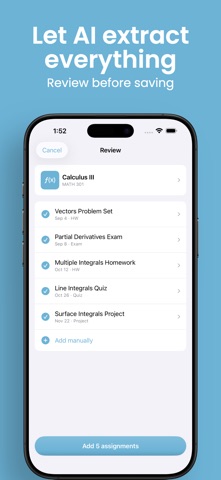
Syllabus day is overwhelming. Pages of due dates, exams, and assignments land — and somehow you're expected to remember all of it. Sylly takes care of that. Just scan your syllabus (or snap a photo, or import a PDF), and Sylly uses AI to instantly pull out every assignment, exam, quiz, and project with its due date. Review everything, make any edits, and save it all in seconds. No more manually typing dates into your calendar. No more missed deadlines because you forgot page 4 of the syllabus. HOW IT WORKS 1. Scan your syllabus using your camera, photo library, or PDF import 2. Sylly extracts all assignments and due dates using AI 3. Review and edit anything before saving 4. Export due dates to Apple Calendar with one tap KEY FEATURES - AI-powered scanning — extracts assignments, exams, quizzes, and projects automatically - Due date reminders — a notification before each deadline, with more warning for an exam than for homework - Multi-page support — scan entire syllabi, not just one page - Three ways to import — camera scanner, photo library, or PDF from Files - Smart organization — courses with color-coded cards and icons - Week and month views — see what's due today, or look ahead to any date - Course info — office hours, late policy, and grading breakdown, pulled straight from your syllabus - Calendar export — add all your due dates to Apple Calendar instantly - Track progress — mark assignments as completed - Dark mode — easy on the eyes during late-night study sessions Built by a student, for students. Start the semester right.
Latest release
What’s New
Reminders are here. Sylly can now remind you before something is due. How far ahead depends on the work: an exam warns you earlier than a homework set, and when your syllabus states its own lead time, Sylly uses that instead. Reminders are built on your phone, so nothing about your courses leaves the device. See any week, or the whole month. Tap the date on the Calendar tab to open a full month, with colored dots marking the days you have work. Arrows move between months, and the Today button brings you back. The week strip now follows the day you pick instead of being stuck on today. Course info from your syllabus. Sylly now also picks up office hours, the late policy and the grading breakdown, and keeps them on the course page. Anything your syllabus doesn't mention is simply left out. More accurate dates. Sylly reads the term off your syllabus instead of assuming the current year, so a spring syllabus scanned in the fall no longer puts every date in the past. Assignments can carry a real due time too, and when the syllabus doesn't give one, Sylly no longer invents 12:00 AM. A refreshed look. Every screen has been redesigned. Assignment rows show an icon for the type of work, the add and edit screens are cleaner, and scanning has a new animation. Also in this update: - Fixed a crash when opening the scanner on Mac - Photo and PDF imports keep their page order, and adding more pages no longer replaces the ones you had - Blank pages are skipped instead of failing the whole scan - Imports are capped at 20 pages with a clear message rather than a silent failure - Turn reminders on or off from Settings > Reminders - The calendar export screen updates as soon as you grant access in iOS Settings - Clearer messages when a photo won't load, a PDF won't open, or something can't be saved - Settings shows the correct version number
Audience growth
Ratings growth
Baseline captured. Growth appears after the crawler observes a changed rating count.
Momentum comes from crawler snapshots for the tracked storefront. “Viral growth signal” means unusually fast recent rating gains; it is an indicator, not download data.
Price tracking
Price intelligence
First snapshot captured. The trend line starts after the next crawler price observation.
- First observed Sep 11, 2026 · 7:36 PM Free
Screenshots