About this app
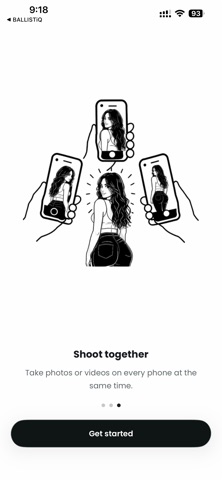
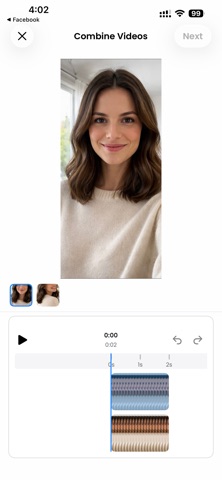
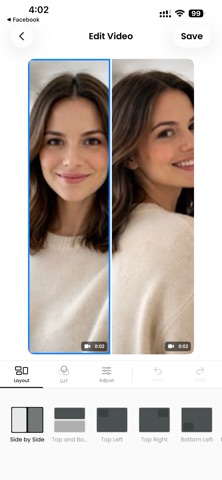
Shoot from every angle at the same moment - using only iPhones. SYNCAM turns a group of iPhones into one synchronized camera rig. One phone leads the session, the others join over the local network, and a single tap captures a photo or starts a video on every connected device at the same time. No cables. No external rigs. No cloud uploads to wait on. Made for the moments where one camera isn’t enough: • Weddings and family events from multiple angles • Sports, dance, and martial arts captured side-by-side • Music videos, BTS, and short films without a film crew • Real estate and product shoots with synced views • Creator multi-cam content with built-in editing What you get • Synchronized capture - clock-aligned shutter so the frames line up • Photo and video modes - switch on the lead phone, all phones follow • Live status from joined phones - see who’s connected and ready • Session gallery - every shot from every device, grouped automatically • Photo editor - pro LUT filters, brightness, contrast, saturation, color mix, highlights, shadows, sharpen, vignette, blur, and more • Video editor - trim, filters, and adjustments • AI multi-cam merge - combine clips with automatic angle switching • Collage maker - 2 to 5 photos, many layouts (grid, side-by-side, big-left, 4 corners, cross, and more) • One-tap share to Instagram, Facebook, and TikTok • Save anything to your Photos library Why people choose SYNCAM • Local network only - your sessions don’t leave your phones • No accounts to create • No rigs, mounts, or extra hardware • Works with any modern iPhone you already own How it works 1) Open SYNCAM on the main phone and start a session. 2) Open SYNCAM on the other phones and tap to join. 3) Frame your shot, pick photo or video, then tap once. Every phone fires together. 4) Review the session, edit your favorites, and share. Permissions SYNCAM uses your camera, local network, and Photos library to capture, sync, and save. Sharing to Instagram Stories, Facebook, and TikTok requires those apps to be installed. Set up your first multi-phone session in under a minute. Download SYNCAM and shoot anything from every angle, together.
Latest release
What’s New
- Languages: Choose your preferred language in Settings; the app UI updates across supported locales. - Share: Share photos and videos to Instagram Stories, Facebook, and TikTok from the save/share flow when sharing is enabled.
Audience growth
Ratings growth
Baseline captured. Growth appears after the crawler observes a changed rating count.
Momentum comes from crawler snapshots for the tracked storefront. “Viral growth signal” means unusually fast recent rating gains; it is an indicator, not download data.
Price tracking
Price intelligence
First snapshot captured. The trend line starts after the next crawler price observation.
- First observed Sep 6, 2026 · 2:13 PM Free
Screenshots