About this app
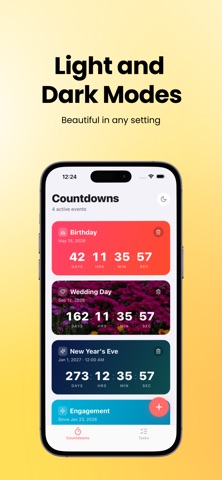
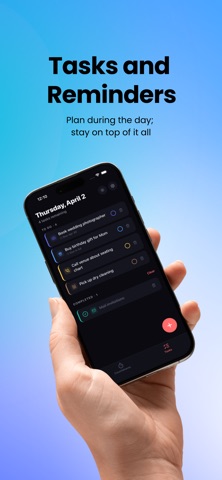
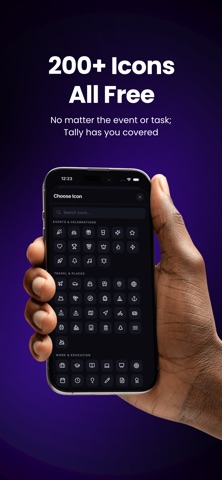
Tally is a simple, beautifully designed place for the moments you are looking forward to—and the milestones you want to remember. COUNTDOWNS Create countdowns for trips, birthdays, launches, weddings, goals, and anything else that matters. Every countdown shows a consistent breakdown in months, days, hours, and minutes. Open any countdown for its exact date, full details, and quick actions. DAYS SINCE Count up from meaningful dates and milestones. Track a new habit, an anniversary, a move, or any moment worth remembering. MAKE IT YOURS Choose from colorful card themes, search a focused icon collection, or use one of your own photos as the background. Your selected photos are stored with the app so your cards keep their look. STAY ORGANIZED Sort countdowns from soonest to farthest, farthest to soonest, by name, or by when they were created. Prefer your own arrangement? Switch to manual order and move cards exactly where you want them. Completed countdowns stay available in a separate Past Events section. REMINDERS ON YOUR TERMS Choose a countdown reminder for the event time, one day before, one week before, or a custom number of days. Daily task reminders can be enabled separately for the morning and evening. Tally asks for notification permission only when you turn on a reminder. SHARE AND PLAN Share a clear countdown summary using the iPhone share sheet, or open Apple's event editor to add a countdown to Calendar after reviewing its details. DAILY TASKS Keep a lightweight to-do list beside your countdowns. Add colors, icons, and optional deadlines, check off completed work, and carry unfinished tasks forward. PRIVATE AND OFFLINE No account is required. Tally stores your countdowns, tasks, preferences, and photos on your device and works without an internet connection. Tally also includes light and dark themes, haptic feedback, VoiceOver labels, generous touch targets, and layouts designed to accommodate larger text.
Latest release
What’s New
- Every countdown card now shows months, days, hours, and minutes in a balanced layout. - Tap a countdown to open a polished details view with its exact date and quick actions. - Add countdowns to Calendar using Apple's event editor. - Sort countdowns automatically, arrange them manually, and find completed countdowns under Past Events. - Choose from more colors and icons, with improved icon search and recently used choices. - Duplicate countdowns from the details screen. - Additional VoiceOver, touch-target, and larger-text refinements.
Audience growth
Ratings growth
Baseline captured. Growth appears after the crawler observes a changed rating count.
Momentum comes from crawler snapshots for the tracked storefront. “Viral growth signal” means unusually fast recent rating gains; it is an indicator, not download data.
Price tracking
Price intelligence
First snapshot captured. The trend line starts after the next crawler price observation.
- First observed Sep 4, 2026 · 1:02 PM Free
Screenshots