About this app
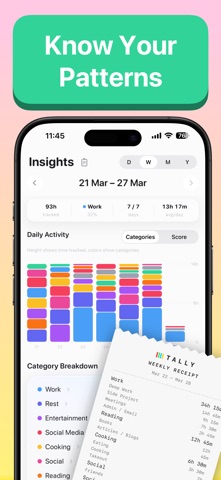
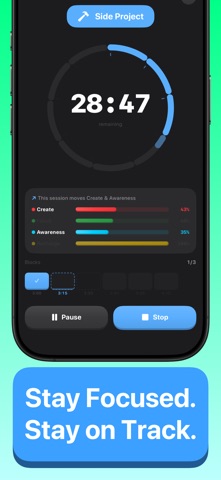
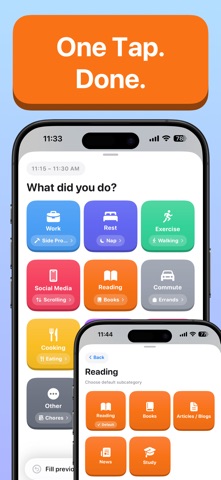
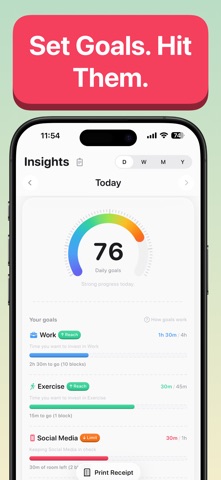
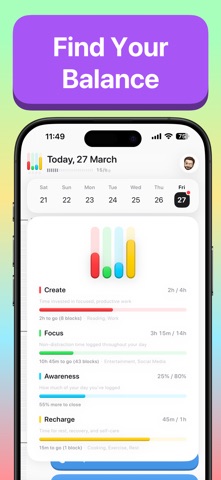
You know the feeling. It's 9 PM and you're wondering where the day went. You were busy — but doing what, exactly? Tally answers that question. Not with timers or complicated tracking. Just a gentle nudge throughout the day: "What did you just do?" Tap a category and you're done. Three seconds, tops. Do this for a few days and something shifts. You stop guessing and start seeing. The afternoon you thought was productive? Mostly phone. The evening you felt was wasted? Actually a solid mix of cooking and reading. Tally doesn't judge. It just shows you the picture. YOUR DAY AT A GLANCE Your daily timeline is a visual map of how your hours were spent, color-coded by category. At a glance, you see the shape of your day — what you did, and what slipped by unlogged. LOG WITHOUT THINKING - A gentle nudge at the interval you choose - Quick-log directly from the notification — no need to open the app - Pick from your most-used categories with a single tap - Only active during your waking hours — you set the schedule CATEGORIES THAT FIT YOUR LIFE Tally comes with 10 default categories: Work, Rest, Exercise, Social Media, Reading, Commute, Cooking, Entertainment, Social, and Other. Add your own — unlimited, with custom icons and colors. Your categories should reflect how you actually spend time, not how you wish you did. BALANCE, NOT JUST DATA Tally tracks four dimensions of a well-spent day through balance bars: - Create: time spent on focused, productive work - Recharge: rest, exercise, cooking — recovery that actually counts - Focus: your day minus the distractions - Awareness: how much of your day you've accounted for Each bar has a personal target. When all four close, you've had a balanced day — by your own definition, not anyone else's. SEE THE PATTERNS The Insights tab breaks down your time across four views: - Daily: where today's hours went, charted by category - Weekly: seven days side by side — spot the rhythm of your week - Monthly: trends that only emerge over longer stretches - Yearly: the full picture of how your time adds up No scores designed to guilt you. Just clean data about your own life. BUILT TO STAY OUT OF YOUR WAY - iCloud sync keeps your data across all your devices - Dark mode that follows your system setting - Works offline — your data is local first, always - No account required. No sign-up. No analytics tracking you. Tally is completely free. Every feature, every insight, every category — no paywalls, no limits, no "upgrade to unlock" screens. WHAT TALLY IS NOT Tally is not a Pomodoro tool. There are no work/break cycles. Tally is not a billing tracker. There are no projects or clients. Tally is a mirror. It shows you where your time goes. What you do with that information is entirely up to you. Terms of Use: https://www.theblackholecompany.com/termsConditions.html
Latest release
What’s New
Tally 1.0.3: For the night shift • Overnight days: Set your active hours past midnight (say 8 PM to 6 AM) and Tally treats it as one continuous day. Your timeline, blocks, streak, and insights all stay in sync, no more day splitting in half at midnight. • Stability and polish: Fixes across notifications, timer, widgets, and sync. Smoother animations, fewer edge cases, and small refinements throughout. Thank you for tracking with Tally.
Audience growth
Ratings growth
Baseline captured. Growth appears after the crawler observes a changed rating count.
Momentum comes from crawler snapshots for the tracked storefront. “Viral growth signal” means unusually fast recent rating gains; it is an indicator, not download data.
Price tracking
Price intelligence
First snapshot captured. The trend line starts after the next crawler price observation.
- First observed Aug 20, 2026 · 6:54 PM Free
Screenshots