About this app
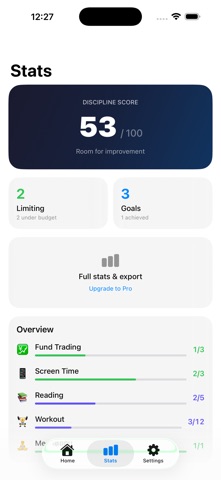
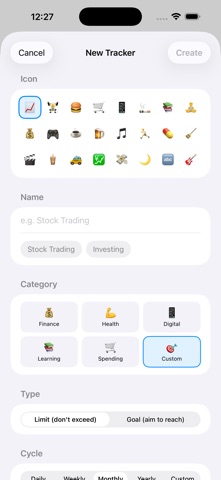
Not another streak tracker. Tally Rule treats your habits like a budget — set a quota, tap to tally, and see your balance. No guilt. No broken streaks. Just the numbers that help you choose. HOW IT WORKS 1. Create a tracker (e.g., "Online Shopping — 4x/month") 2. Tap +1 each time you do it 3. Watch your remaining balance It's that simple. The number tells the truth. You decide what to do with it. FEATURES - Cycle-based quotas — daily, weekly, monthly, yearly, or custom - One-tap tally with real-time balance - Ring progress for intuitive visualization - Categories — Finance, Health, Learning, Lifestyle & more - Historical charts & calendar heatmap to review past cycles - Over-budget alerts (no judgment, just a heads-up) - Home screen widgets — always see your balance - Interactive widget — tap +1 right from your home screen - Live Activity & Dynamic Island — track on your lock screen - Apple Watch app — tally from your wrist - iCloud sync — seamless across all your devices PRO UPGRADE ($2.99, one-time) - Unlimited trackers (free: up to 5) - Yearly & custom cycle types - Full historical stats & CSV export - Medium & large widgets - iCloud sync - Apple Watch support PRIVACY FIRST - Local storage by default — your data stays on your device - Optional iCloud sync (Pro) — encrypted, only you can access - No account required - No ads, no tracking, no data collection USE CASES - Limit stock trades to 5x/month - Keep takeout orders under 3x/week - Hit 12 gym sessions/month - Read 3 chapters/week - Anything you want to budget Built for people who believe in seeing clearly, not being judged.
Latest release
What’s New
Live Activities now update the instant you tally from the main list — no more stale numbers in the Dynamic Island. Tallies you record from the widget are now counted the same way as everywhere else in the app. Plus a round of under-the-hood cleanup so every place you can tally behaves identically.
Audience growth
Ratings growth
Baseline captured. Growth appears after the crawler observes a changed rating count.
Momentum comes from crawler snapshots for the tracked storefront. “Viral growth signal” means unusually fast recent rating gains; it is an indicator, not download data.
Price tracking
Price intelligence
First snapshot captured. The trend line starts after the next crawler price observation.
- First observed Aug 19, 2026 · 12:05 AM Free
Screenshots