About this app
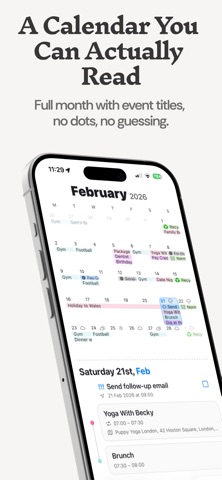
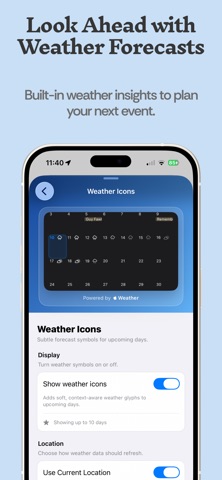
TapCal is a beautifully designed iOS calendar built for clarity, speed, and control. Most calendar apps hide your schedule behind clutter and tiny indicators. TapCal gives you a clean month view with real event context, full reminders support, and widgets that are actually useful. WHY TAPCAL • See your month properly TapCal shows real event titles in month view and widgets, so you can understand your schedule at a glance. • Full Reminders integration Create, edit, complete, and manage reminders directly in TapCal. Set list, priority, due date/time, repeat rules, location alerts, and notes. See reminders in your timeline and widgets alongside events. • Fast event creation Type “Lunch with Alex tomorrow at 1pm” and TapCal uses Natural Language detection to pick up the dates instantly. • Better widgets Month, week, list, and heatmap widgets with readable information and reminder support. • One clear daily timeline Events and reminders appear together, so you can plan your day in one place. • Powerful controls, simple UX Use calendar sets, custom alerts, badge modes, and day highlights without a complicated workflow. • Make it yours Customize themes, fonts, and layout behavior to match how you plan. • Native iOS performance Built for iPhone with fast, smooth, responsive interactions. • Privacy first No account required. Your data stays in Apple’s calendar/reminder ecosystem and your connected calendars. Your schedule, without the friction. Download TapCal today. Terms of Use: https://tapcal.app/terms-and-conditions Privacy Policy: https://tapcal.app/privacy-policy
Latest release
What’s New
- A new Month & List widget combines a compact calendar with your upcoming events and reminders. Customize it from Widget Settings. - Create reusable event templates from Settings → Calendar Settings → Event Templates. Matching templates are suggested as you type an event title. - Quickly move or duplicate events from their context menu. - Respond to calendar invitations without leaving TapCal. - Pending invitations now use striped styling so they’re easy to distinguish. A new indicator and Invitations option in the Calendar Sets menu show when a response is needed. - Browse and add Interesting Calendars from Settings → Calendars & Lists → Add → Interesting Calendars. Requires TapCal Pro. - New Lock Screen widgets can show all-day and timed events together, while the existing Upcoming widgets remain focused on timed events. - Complete reminders directly from supported widgets. - Subscription event details have a refreshed design, including location maps and additional actions. - Faster calendar loading and improved caching help prevent the calendar briefly appearing empty when you have lots of events. - Choose when notifications for all-day events are delivered. The default is 9:00 AM.
Audience growth
Ratings growth
Baseline captured. Growth appears after the crawler observes a changed rating count.
Momentum comes from crawler snapshots for the tracked storefront. “Viral growth signal” means unusually fast recent rating gains; it is an indicator, not download data.
Price tracking
Price intelligence
First snapshot captured. The trend line starts after the next crawler price observation.
- First observed Sep 6, 2026 · 12:26 PM Free
Screenshots