About this app
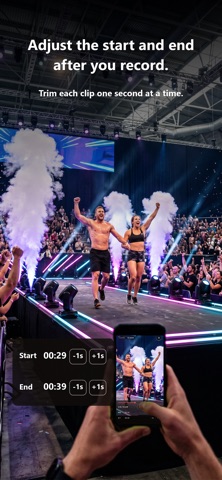
Tap while you're filming, and Tapclip keeps that moment for you, starting a few seconds before your tap. Tap as often as you like. They all become one short video. Sound familiar? You filmed the whole game, and now it's too long to find the one part you actually wanted. You keep filming, and finding the good part later is always a chore. That's what Tapclip is for. You're filming, something happens, and you think "That's the one!" Just tap the screen. That's all it takes. Tapclip keeps the seconds before and after your tap, then joins every moment you tapped into a single short video. Your best moments, always easy to watch again. Three steps 1. Start recording 2. Tap the screen when something good happens 3. Stop, and your best moments are already one short video Tidy it up afterwards - Save all your clips joined together as one video - Trim the start and end of any clip, one second at a time - Delete a clip you tapped by mistake - Play any clip back to check it - Reorder your clips (Tapclip Pro) - Save or share clips one at a time (Tapclip Pro) Go further with Tapclip Pro - No watermark - No recording time limit - Choose your own before and after seconds - Reorder, save and share clips one at a time Tapclip Pro is available as a monthly or yearly subscription, or as a one-time purchase. Subscriptions renew automatically unless cancelled at least 24 hours before the end of the current period. You can manage or cancel in your App Store account settings. Terms of Use (EULA): https://www.apple.com/legal/internet-services/itunes/dev/stdeula/ Privacy Policy: https://kenchiiiii1234.github.io/tapclip-privacy/ Support: https://kenchiiiii1234.github.io/tapclip-support/
Latest release
What’s New
- Zoom while you film. A slider at the bottom takes you from 0.5x to 5x. - Every tap now makes its own clip. Tap twice in a row and you get two, even when they overlap. - Taps register the moment your finger lands, so nothing gets missed. - You can now film without giving Tapclip access to the microphone. - Tapclip warns you when storage runs low and stops safely before it runs out.
Audience growth
Ratings growth
Baseline captured. Growth appears after the crawler observes a changed rating count.
Momentum comes from crawler snapshots for the tracked storefront. “Viral growth signal” means unusually fast recent rating gains; it is an indicator, not download data.
Price tracking
Price intelligence
First snapshot captured. The trend line starts after the next crawler price observation.
- First observed Sep 8, 2026 · 3:42 PM Free
Screenshots