About this app
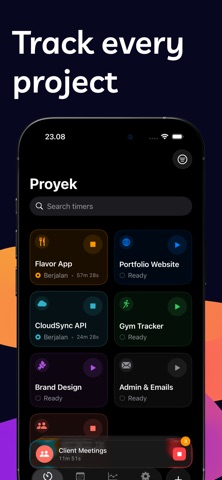
Tempo is the simple, beautiful time tracker built for freelancers, consultants, and anyone who needs to know where their hours go. Start a timer in one tap. Run multiple timers across different projects at the same time. See exactly how you spend your workday with clear reports and statistics - all in a privacy-first app with no subscriptions. TRACK TIME YOUR WAY - Start and stop project timers with a single tap - Run multiple timers simultaneously - one per project - See live elapsed time on your Lock Screen and Dynamic Island - Quick-start timers from Control Center without opening the app - Use Siri Shortcuts to start, stop, or toggle timers hands-free - Add notes and tags to every time entry for detailed logging ORGANIZE BY PROJECT - Create color-coded projects with custom icons - Tag entries for granular categorization - View your full time entry history grouped by day - Edit past entries to fix mistakes or add details UNDERSTAND YOUR TIME - Daily, weekly, and monthly time reports - See project breakdowns with interactive charts - Track total hours worked and identify patterns - Export-ready statistics to share with clients DESIGNED FOR FOCUS - Shortcuts-style project cards for instant access - Polished native interface with smooth animations - Haptic feedback on every interaction - Full iPad support with adaptive layouts - Works with VoiceOver, Dynamic Type, and Reduce Motion PRIVACY FIRST - No account required - your data stays on your device - No analytics, no ads, no invasive tracking FREE TO START, ONE PRICE TO UNLOCK EVERYTHING Tempo is free with one project. Unlock unlimited projects, tags, full history, and detailed statistics with a one-time purchase. No subscriptions. No recurring fees. Pay once, use it forever. Whether you're a freelance designer logging billable hours, a consultant tracking client work, or simply want to understand how you spend your day, Tempo gives you the clarity you need without the complexity you don't. Questions or feedback? We'd love to hear from you.
Latest release
What’s New
This update makes Tempo Pro clearer as a one-time unlock and improves App Store keywords and copy so Tempo is easier to find.
Audience growth
Ratings growth
Baseline captured. Growth appears after the crawler observes a changed rating count.
Momentum comes from crawler snapshots for the tracked storefront. “Viral growth signal” means unusually fast recent rating gains; it is an indicator, not download data.
Price tracking
Price intelligence
First snapshot captured. The trend line starts after the next crawler price observation.
- First observed Aug 20, 2026 · 6:11 AM Free
Screenshots