About this app
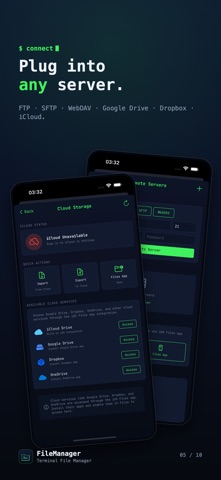
The ultimate file manager for power users. Organize, secure, and transfer files with a sleek terminal-inspired interface. Turn your iPhone and iPad into a wireless file server. Browse, transfer, encrypt, and edit any file — fast, private, and wrapped in a slick terminal‑inspired interface. No account. No ads. Your files never leave your device unless you choose to send them. KEY FEATURES • FTP Server - Turn your iPhone into an FTP server. Transfer files wirelessly from any computer • WiFi File Transfer - Share files between devices on the same network instantly • Secure Vault - Protect sensitive files with Face ID, Touch ID, or passcode • Code Editor - Edit Swift, Python, JavaScript, HTML, CSS & 20+ languages with syntax highlighting • Cloud Integration - Access iCloud, Google Drive, Dropbox & OneDrive through iOS Files • Nearby Transfer - Send files to nearby Apple devices using peer-to-peer connectivity FILE MANAGEMENT • Browse, copy, move, rename & delete files • Create folders and organize your documents • Compress & extract ZIP archives • Batch operations for multiple files • Smart search across all your files • Sort by name, date, size or type • Grid and list view options MEDIA & DOCUMENTS • Built-in photo & video viewer • PDF reader with page thumbnails • Music player with background playback • Image editor with filters & adjustments • Markdown viewer • Document preview for Office files PRODUCTIVITY TOOLS • Notes app with rich text formatting • Bookmarks for quick folder access • Recent files for fast access • Trash bin with recovery option • File information & metadata viewer • Duplicate file finder SECURITY • App lock with biometric authentication • Private vault for sensitive documents • Secure file encryption • No cloud dependency - files stay on device CUSTOMIZATION • Multiple themes including dark mode • Terminal-style green interface • Adjustable font sizes • Customizable home screen layout TRANSFER OPTIONS • FTP server with configurable port & credentials • WiFi HTTP server for browser access • Nearby device discovery • Import from Photos, Files & other apps • Share extension support Perfect for developers, students, professionals & anyone who needs powerful file management on iOS. Download now and take control of your files!
Latest release
What’s New
• New: roomier, readable layout on iPad in landscape & Split View • Open files right from Recent, Favorites & Categories • Recent now remembers every file you open • Star files to Favorites — now working as expected • Images open instantly in a clean, themed viewer • Code & text files open in a dark, terminal-style viewer • Bigger, sharper file grid on iPad • Categories now always show the right files • Fixed an iPad navigation snag that could trap you in a folder • Polished theming across viewers, sidebar & tools
Audience growth
Ratings growth
Baseline captured. Growth appears after the crawler observes a changed rating count.
Momentum comes from crawler snapshots for the tracked storefront. “Viral growth signal” means unusually fast recent rating gains; it is an indicator, not download data.
Price tracking
Price intelligence
First snapshot captured. The trend line starts after the next crawler price observation.
- First observed Aug 5, 2026 · 7:40 PM $1.99
Screenshots