About this app
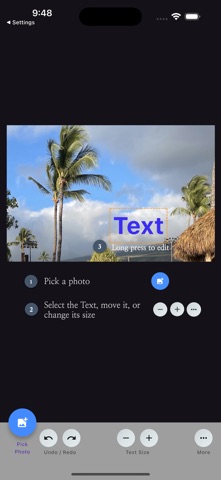
TextOn | Add Text to Photos App Add a story to your photos. TextOn is an app that helps you quickly and easily add text to your precious photos and images, allowing you to convey your own messages. With just a few taps, you can insert text into your photos without complex steps and enrich your creations. It is designed to be user-friendly for everyone, from professional tasks to daily records. Key Features & Highlights - Simple Text Addition: Type your desired text and create your own style with various fonts and colors. - Intuitive Editing Tools: Easily adjust the position, size, and opacity of your text. - Real-time Preview: See how the text looks on your photo in real-time, providing convenience. - High Performance: Enjoy a smooth, uninterrupted user experience while adding and editing text. How to Use 1. Select a Photo: Choose a photo from your gallery. 2. Add Text: Tap the 'Text' button to enter your desired text. 3. Free Editing: Use your fingers to move the text and the edit menu to change its size, opacity, and color. 4. Save & Share: Tap the 'Share & Save' button to save the photo with text to your gallery, or tap the 'Share' button to share it directly on SNS, etc. Moments when TextOn is needed - SNS Upload: When you want to add a message or information when uploading photos to Instagram, blogs, etc. - Daily Records: When you want to mark photos of precious moments with the date or location. - Special Card Creation: When you want to add emotional text to a photo to create a special card. With TextOn, all of your photos will shine even brighter and become more meaningful. Download it now to turn your photos into special stories!
Latest release
What’s New
SDK updates, added languages
Audience growth
Ratings growth
Baseline captured. Growth appears after the crawler observes a changed rating count.
Momentum comes from crawler snapshots for the tracked storefront. “Viral growth signal” means unusually fast recent rating gains; it is an indicator, not download data.
Price tracking
Price intelligence
First snapshot captured. The trend line starts after the next crawler price observation.
- First observed Aug 27, 2026 · 3:24 PM Free
Screenshots