About this app
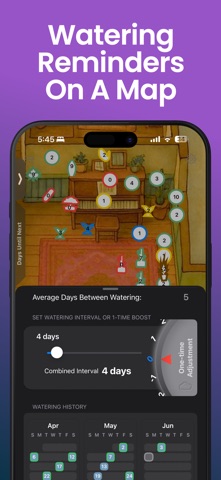
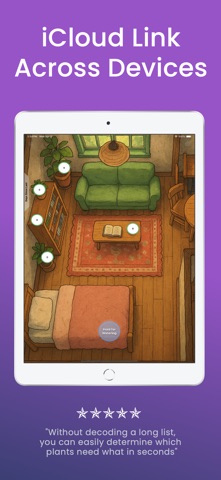
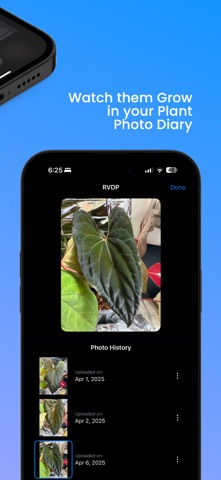
See what needs care at a glance, not buried in a list. The Plant Map shows every plant in your collection on a visual, color-coded map so you can see what needs water, what can wait, and what needs attention right now. Your plants, where they actually live Most plant apps give you a list. The Plant Map puts your plants on a map of your real space, your windowsill, your shelf, your patio, so you see everything in context and know where to start. Open the app, read the colors, and you're done. What you can do • Place plants on a private map built from a quick on-device 3D scan of your space. No sharing, no cloud processing. • Track watering, fertilizing, misting, rotating, or create your own custom care labels. All available to free users, not locked behind a subscription. • Fine-tune any interval with a one-time adjustment per session so a quick snooze or a dry spell doesn't throw off your carefully tuned schedule. • Choose reminders your way: per-plant notifications, a daily summary, or none at all. • Keep a photo history and quick field notes to remember changes over time. • Add notes and track progress without needing to name or photograph every plant just to tell them apart. • Designed with accidental-tap protection for when your phone is tucked under your arm and your hands are full of soil. Why a map changes everything You don't think about your plants as rows in a spreadsheet. You remember them by where they are. With color-coded markers set to your own ratios, you can judge what needs care in seconds, even with 100+ plants. No scrolling, no decoding, no naming required. Lists and generic reminders can work, but they weren't designed around how plant care actually works day to day. The Plant Map gives every plant its own place and remembers everything for you, so you can stop holding it all in your head and just enjoy your plants. Scan your space with AR On supported devices, use LiDAR to scan and generate a precise floor plan. Bring your real environment into a bird's-eye view of your care routine. Works across your devices Start on iPhone, continue on iPad. iCloud backup keeps your plant data backed up. Apple Shortcuts and NFC tags let you scan a sticker on a planter and log care without even opening the app. Privacy first Your maps and plant data stay on your device and under your control. What users say "Every other plant app felt like homework. This one just clicks." – DrCareey "I have 40 plants and stopped losing track of them after I started using this." – Jake T. "I finally stopped killing my plants. This app changed everything." – Maria L. Affordable one-time purchase Start with up to 8 plants free. Unlock unlimited plants with a single purchase, no subscription. All core tools available to free users except iCloud Backup, Group Snoozing, and Custom Shapes.
Latest release
What’s New
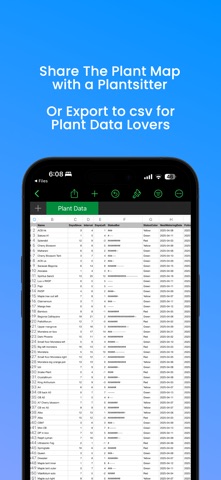
1.2.9 Important update. We found a problem that could cause changes made on one device to replace newer changes on another. This update prevents it. Sync is paused while we rebuild it properly. If you use Plant Map on more than one device, please update all of them. 1.2.8 New hover UI • The hover UI you know, now dramatically more beautiful and refined. • You can now apply fertilizer directly from the hover UI (Care Task 1). New Spreadsheet View • A new information-dense way to view your plant collection. • Add previous waterings more quickly and easily. Siri Plant Names • Siri and Shortcuts can now find and interact with your plants by name. New interval UI design • A fresh, more modern design for setting watering intervals. • Maximum watering intervals have been extended to 6 months.
Audience growth
Ratings growth
Baseline captured. Growth appears after the crawler observes a changed rating count.
Momentum comes from crawler snapshots for the tracked storefront. “Viral growth signal” means unusually fast recent rating gains; it is an indicator, not download data.
Price tracking
Price intelligence
First snapshot captured. The trend line starts after the next crawler price observation.
- First observed Sep 4, 2026 · 1:48 AM Free
Screenshots