About this app
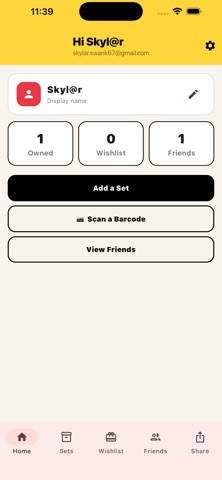
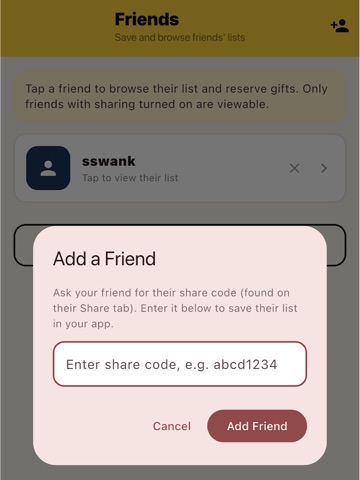
The Set List is the gift registry app for LEGO fans. Create your wishlist, share it with friends and family, and never get a duplicate set again. Whether you're a casual builder or a serious collector, The Set List makes it easy to keep track of the sets you own and the ones you're hoping for — and lets your loved ones know exactly what to get you for birthdays, holidays, or just because. CREATE YOUR SET LIST Add LEGO sets to your owned list or wishlist in seconds. Scan the barcode on the box with your camera, type the barcode number manually, or enter the set details yourself. The app looks up the set name, number, theme, and even shows you a photo — automatically. SHARE WITH FRIENDS & FAMILY Enable sharing to get your unique link. Send it to anyone — they can view your wishlist from their browser, no app required. They'll see exactly which sets you want, with prices and themes, so they can shop with confidence. RESERVE GIFTS (SURPRISE-PRESERVED) When someone buys you a gift from your list, they can reserve it right in the app. Other friends will see it's taken — but you won't see a thing. The surprise stays intact until you unwrap it. FRIENDS LIST Add friends by their share code. View their wishlists and reserve gifts for them, all in one place. No more group chat chaos trying to coordinate who's buying what. KEY FEATURES • Barcode scanner — point your camera at the LEGO box barcode to instantly look up the set • Manual barcode entry — type the EAN or UPC number from the box if scanning doesn't work • Set images — see a photo of the set when you look it up • Owned list — track every set in your collection • Wishlist — keep a running list of sets you want • Share link — let friends and family view your list from any browser • Gift reservations — friends can mark gifts as taken without spoiling the surprise • Friends list — follow your LEGO-loving friends and shop their lists • Cloud sync — your data syncs across all your devices via your account • Privacy first — your lists are private until you choose to share them The Set List. The easiest way to share the sets you love.
Latest release
What’s New
• Create multiple wishlists on one account — perfect for parents managing lists for kids who don't have their own device • Redesigned Brick Buddy view: browse their Master List, wishlists, and custom lists, or scan a set to instantly check if they already have or want it • Search for any set by scanning a barcode, or typing a UPC, set number, or name — now available throughout the app • Add a Brick Buddy by scanning their QR code, no more typing share codes • New Brick Inventory: track loose parts you have at home, and they're automatically applied when you start a new Build Tracker project • Add your own photos to items on your lists — your Inner Circle can see them too • Build Tracker: type an exact quantity to add/subtract, or mark a part fully collected in just one tap • Your Brick Buddy's Master List now shows each set's actual build status (Not Started/Building/Built) instead of a generic "Has it" • Under-the-hood security and reliability improvements
Audience growth
Ratings growth
Baseline captured. Growth appears after the crawler observes a changed rating count.
Momentum comes from crawler snapshots for the tracked storefront. “Viral growth signal” means unusually fast recent rating gains; it is an indicator, not download data.
Price tracking
Price intelligence
First snapshot captured. The trend line starts after the next crawler price observation.
- First observed Aug 28, 2026 · 9:17 AM Free
Screenshots