About this app
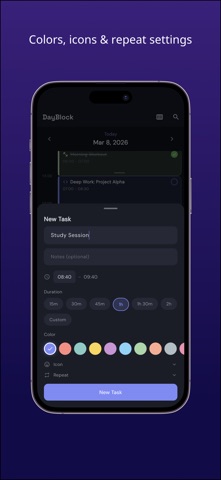
DayBlock is a daily planner app that uses time blocking to manage your day visually. Key Features: Timeline Task Management Place colorful blocks on the timeline to visualize your daily schedule. Drag to move and resize from the bottom edge to adjust duration. 5-minute snap intervals for precise scheduling. 10 Colors x Icons Assign your favorite color and icon to each task. Instantly distinguish categories like work, study, exercise, and breaks at a glance. Repeating Tasks Set daily, weekly, monthly, or yearly repeats. Supports day-of-week selection and custom intervals. Set it once and tasks are generated automatically. Routines Save morning prep or evening habits as templates. Apply them to today's timeline with a single tap. Inbox Jot down tasks as they come to mind. Schedule them to your timeline later so you never lose an idea. Weekly View See all 7 days at a glance. Adjust your plans while viewing the balance of your entire week. Subtasks Add checklist-style subtasks to any task. Break big tasks into smaller manageable steps. Current Time Indicator A real-time indicator shows the current time on your timeline. Always know what you should be doing right now. Clean Distraction-Free Design A calm dark-themed UI designed for focus. Minimal design that works well for ADHD and anyone who needs fewer distractions.
Latest release
What’s New
Bug fixes.
Audience growth
Ratings growth
Baseline captured. Growth appears after the crawler observes a changed rating count.
Momentum comes from crawler snapshots for the tracked storefront. “Viral growth signal” means unusually fast recent rating gains; it is an indicator, not download data.
Price tracking
Price intelligence
First snapshot captured. The trend line starts after the next crawler price observation.
- First observed Aug 15, 2026 · 1:31 PM Free
Screenshots