About this app
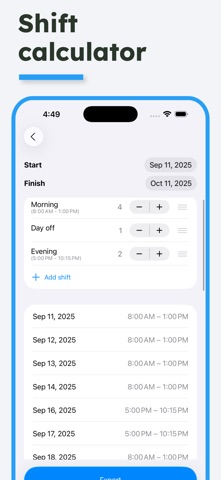
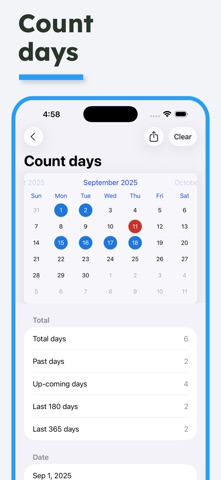
Time Calculator is the ultimate all-in-one toolkit for managing time, dates, schedules, and more. Whether you’re tracking work hours, planning shifts, or converting time formats, this app has a calculator for every time-related need. Designed for professionals, freelancers, travellers, and everyday users alike. Included calculators: - Time Calculator Add or subtract hours, minutes, seconds, and days. Optionally apply an hourly rate for cost calculations. - Work Time Calculator Track working hours, salaries, and multiple jobs. Supports custom shifts and detailed breakdowns. - Shift Calculator Create and calculate rotating shift schedules with ease. - Date Calculator Find the difference between two dates in days, weeks, months, and years. - Time Difference Calculate the time between two clock times. - Countdown Set up countdown timers for upcoming events or deadlines. - Weekday Calculator Calculate how many weekdays and weekends are between two dates. - Add to Date Calculator Add days, weeks, months, or years to a starting date to see the resulting date. - Count Days Tap days on a calendar to count them - perfect for tracking Schengen or visa limits. - Days To/From Save countdown timers for any event and see how many days remain. - Add to Time Calculator Add hours and minutes to a specific time of day. - Age Calculator Add birthdays of friends and family to track their exact age. - Time Converter Convert between seconds, minutes, hours, and days. - Time Zone Calculator Add multiple time zones and compare times across regions. - Military Time Calculator Easily convert between 12-hour and 24-hour (military) formats. - Time to Decimal Convert standard time (like 2h 30m) to decimal format and back. --------------------------- Subscription terms: - The subscription auto-renews at the end of each term. - Payment will be charged to iTunes Account at confirmation of purchase. - The subscription automatically renews unless auto-renew is turned off at least 24-hours before the end of the current period. - Account will be charged for renewal within 24-hours prior to the end of the current period. - You may manage your subscription and turn off auto-renewal by going to your Account Settings after purchase. Privacy policy and Terms of Use: https://oval.fi/privacy-policy-time-calculator
Latest release
What’s New
Bug fixes & improvements
Audience growth
Ratings growth
Momentum comes from crawler snapshots for the tracked storefront. “Viral growth signal” means unusually fast recent rating gains; it is an indicator, not download data.
Price tracking
Price intelligence
- First observed Aug 10, 2026 · 1:51 PM Free
Screenshots