About this app
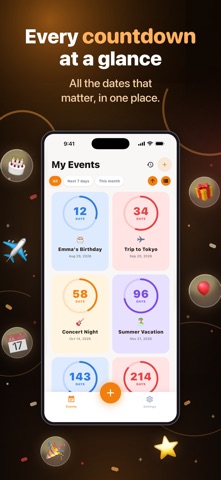
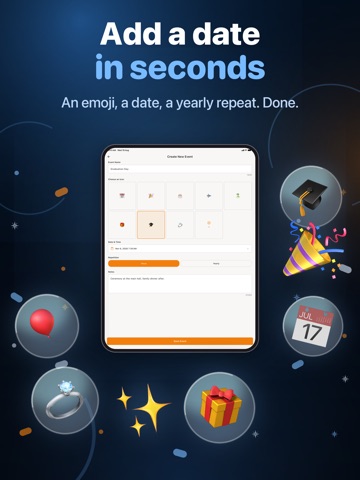
Some dates deserve better than a note buried in your calendar. TimeLeft turns the moments you are waiting for into live countdowns you can read at a glance — in the app and right on your Home Screen. WHAT YOU CAN DO • Create a countdown in seconds: a name, an emoji, a date and a time • Watch the time left tick down in months, days, hours and minutes • Pin your most important event to a Home Screen widget • Switch between a compact list and a visual grid • Filter by All, Next 7 days or This month, and sort by closest or furthest away • Add notes to an event so the details travel with the date • Look back at everything that has already happened FOR EVERY KIND OF DATE Birthdays and anniversaries. Trips and holidays. Weddings and graduations. Concerts, exams, paydays, due dates, retirement, Christmas and New Year. Anything you are counting on. DAILY REMINDERS Turn reminders on and TimeLeft checks in once a day at noon, so nothing important quietly sneaks up on you. MAKE IT YOURS Pick an emoji for every event from a searchable picker. Set dates to repeat every year for the ones that come back around. Choose a light, dark or system theme. Use the app in English, Spanish, Portuguese, French, Italian, Russian or Simplified Chinese. NOTHING TO SET UP No account, no sign-up, no login. Your events stay on your device and the app works offline. Start counting down to what matters.
Latest release
What’s New
• New icon picker: 200+ emojis organized into themed categories — Celebrations, Travel, Food, Sports, Love, Family, Work, Nature, Music, Holidays — plus a searchable general set • The Home Screen widget now always shows your nearest upcoming event automatically and updates itself day by day, with no manual setup • Fixed a crash when the update-available prompt tried to open the App Store
Audience growth
Ratings growth
Baseline captured. Growth appears after the crawler observes a changed rating count.
Momentum comes from crawler snapshots for the tracked storefront. “Viral growth signal” means unusually fast recent rating gains; it is an indicator, not download data.
Price tracking
Price intelligence
First snapshot captured. The trend line starts after the next crawler price observation.
- First observed Sep 6, 2026 · 8:14 PM Free
Screenshots