About this app
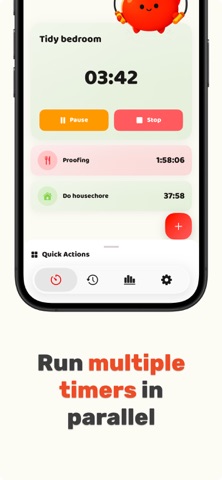
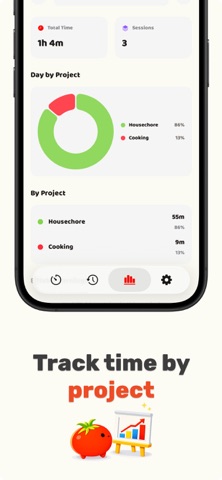
Run stopwatches, countdowns, and Pomodoro sessions all at the same time — no switching between timers. Timerow helps freelancers, students, and multitaskers track billable hours, study sessions, and daily tasks in parallel. Designed for real life where meetings interrupt focus and projects overlap. Timerow is a multitasking time tracker that supports stopwatches, countdown timers, and Pomodoro sessions running in parallel. Real life rarely happens one task at a time. Meetings interrupt focus, cooking overlaps with other chores, and projects constantly switch. Tracklio helps you track everything clearly. Start several timers, organize them by project, and see exactly where your time goes. Key Features • Multiple Timers in Parallel Run multiple timers simultaneously and track different tasks on one screen. • Stopwatch, Countdown, and Pomodoro Use stopwatches for tracking tasks, countdown timers for deadlines, and Pomodoro timers for focused work. • Project-Based Time Tracking Group timers by project to keep your work organized and easy to review. • Billable Time Tracking Track billable hours for freelance work, client projects, or consulting sessions. • Time Statistics Review simple statistics to understand how your time is spent across tasks and projects. • Automation with iOS Shortcuts Start and control timers automatically using Apple Shortcuts. • Clean and Fast Interface Minimal design focused on quick actions and clear visibility of running timers. Common Use Cases • Freelancers tracking billable hours Track time across multiple clients and projects. • Students using Pomodoro sessions Combine Pomodoro focus sessions with other timers. • Multitasking workdays Track focused work while meetings and interruptions happen. • Cooking multiple dishes Run several countdown timers at the same time. • Daily productivity tracking Use stopwatch timers to measure how long tasks actually take. Designed for Real Multitasking Tracklio uses a visual timer layout that makes multiple running timers easy to understand at a glance. • No complicated setup • No switching between timers • Just clear time tracking Built for iPhone Tracklio is designed specifically for iOS with smooth performance, responsive controls, and a modern interface that feels native on iPhone. Track projects, billable work, study sessions, and everyday tasks with multiple timers running together. Download Tracklio and start tracking your time more clearly. Terms of Use (EULA): https://www.apple.com/legal/internet-services/itunes/dev/stdeula/
Latest release
What’s New
Timerow — new name, same essence Tracklio is now Timerow. A clearer name that captures our essence: a row of timers working together. What's new in this version: - New name: Timerow - Updated logo typography and colors - Japanese localization - Korean localization - Minor bug fixes and performance improvements
Audience growth
Ratings growth
Baseline captured. Growth appears after the crawler observes a changed rating count.
Momentum comes from crawler snapshots for the tracked storefront. “Viral growth signal” means unusually fast recent rating gains; it is an indicator, not download data.
Price tracking
Price intelligence
First snapshot captured. The trend line starts after the next crawler price observation.
- First observed Sep 1, 2026 · 2:55 PM Free
Screenshots