About this app
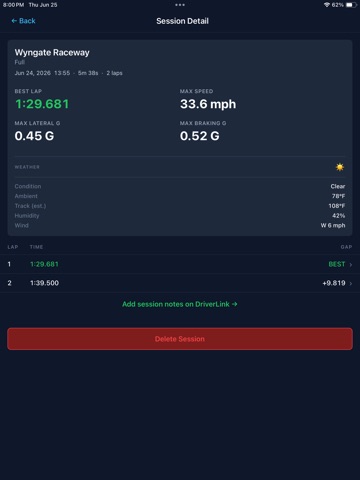
TrackLink is a GPS lap timer for track days, HPDEs, and open lapping and companion app for DriverLink.io. Mount your device, cross the start/finish line, and TrackLink times every lap automatically. LAP TIMING - Automatic GPS lap timing with live speed and a session timer - Delta to your session best, day's best, and personal best - Spoken lap times at each crossing - Per-lap times with gaps to your best HIGH-PRECISION SENSORS - Connect an external GPS/IMU device over Bluetooth for higher accuracy - Supported devices include Dragy and RaceBox - Live satellite count, GPS accuracy, and sample rate - Pair a Bluetooth heart rate monitor for live BPM on your dash SESSION REVIEW - Track map of each lap, color-coded by speed - Compare two laps side by side on the map - Speed and G-force traces with a synced playback scrubber - Lateral and braking G, max speed, and best lap per session - Session weather: conditions, ambient temperature, humidity, and wind - Heart rate trace in replay with average and max per session LIVE TIMING AT EVENTS (ORG MODE) At an event running DriverLink live timing, TrackLink becomes a live dash with data straight from the timing system, lap by lap: - Your class and your position in class - Your gap to the class leader - Your delta to the leader, so you know whether you are catching them or losing ground - Flag status on your dash: green, yellow, red, and checkered - Crew, coaches, and family can watch your session live from any browser, with your position on the track map, speed, and lap times YOUR DATA, ON DRIVERLINK - Sessions sync to your DriverLink profile - Review lap history, personal bests, and session notes on the web - Works at any track in the TrackLink track database Use TrackLink as a standalone lap timer at any track, or connect at an event for live timing and your position in the race. A DriverLink account is required to use the app. Create one free at driverlink.io.
Latest release
What’s New
New in 1.2.0: optional live session broadcasting to driverlink.io, off by default, enabled only by explicit in-app consent (toggle available in Settings).
Audience growth
Ratings growth
Baseline captured. Growth appears after the crawler observes a changed rating count.
Momentum comes from crawler snapshots for the tracked storefront. “Viral growth signal” means unusually fast recent rating gains; it is an indicator, not download data.
Price tracking
Price intelligence
First snapshot captured. The trend line starts after the next crawler price observation.
- First observed Aug 19, 2026 · 10:53 AM Free
Screenshots