About this app
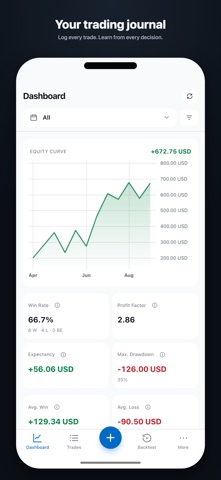
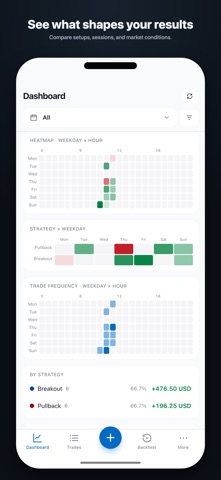
TradeJrnl is a native trading journal that keeps each trade beside its chart. Log real trades and missed setups with entry, exit, risk, screenshots, strategies, tags, and notes. The chart shows what happened around the trade. TRADE REPLAY Replay a completed trade candle by candle. Hide what happened next, review your decisions, and try another approach under the same historical market conditions. BACKTESTING Test strategies directly on historical charts, plan your risk, and record your test trades. The free version stores one backtest session. Premium gives you an unlimited library. ANALYTICS The equity curve, win rate, and profit factor give you a quick overview. Premium adds expectancy, drawdown, R distribution, calendars, sessions, heatmaps, and multi-filters. IMPORTS AND PRICE DATA Manual trades and file imports from cTrader, MT4, and MT5 remain free. Use your own Alpha Vantage, Twelve Data, or Massive key to download price data directly to your device. Premium syncs cTrader trades and matching price data automatically. Broker access is read-only. YOUR DATA STAYS WITH YOU Trades, screenshots, drawings, and price data are stored locally on your device. Choose your backup folder and sync it through iCloud Drive, Google Drive, OneDrive, Dropbox, or another folder provider. You do not need an account for the free version. INCLUDED FOR FREE • Unlimited manual trades • Trade details and trade replay • File imports and your own price-data providers • One backtest session • Backup, restore, and export PREMIUM • Automatic cTrader sync • Advanced analytics and multi-filters • Unlimited backtest sessions TradeJrnl does not place orders or provide investment advice. The store shows the price, trial period, and renewal terms before purchase. Standard EULA: https://www.apple.com/legal/internet-services/itunes/dev/stdeula/
Latest release
What’s New
Performance and stability improvements • Faster startup and smoother dashboard loading • More reliable backups and device sync • Improvements to charts and price data • Small bug fixes and interface refinements
Audience growth
Ratings growth
Baseline captured. Growth appears after the crawler observes a changed rating count.
Momentum comes from crawler snapshots for the tracked storefront. “Viral growth signal” means unusually fast recent rating gains; it is an indicator, not download data.
Price tracking
Price intelligence
First snapshot captured. The trend line starts after the next crawler price observation.
- First observed Sep 4, 2026 · 10:44 AM Free
Screenshots