About this app
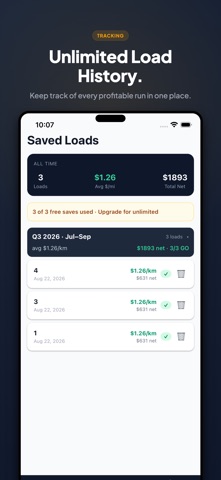
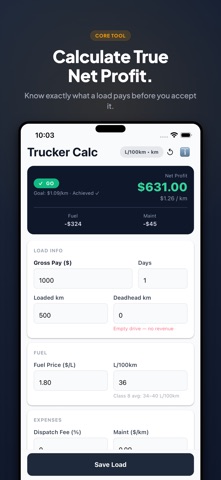
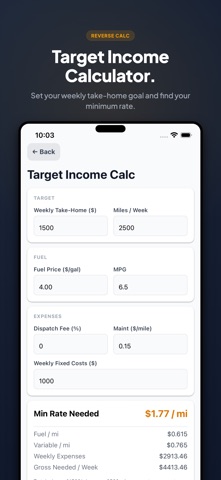
Are you an owner-operator taking spot loads from DAT or Truckstop.com? Before you accept that next load, know your real profit — not just the gross pay. Trucker Calc is the instant profit calculator built for independent truck drivers and small fleet owners. Enter a load, get your GO or NO-GO decision in under 10 seconds. WHAT YOU CALCULATE • Net profit & net profit per mile — your true bottom line • Fuel cost based on actual miles driven, your MPG, and today's pump price • Deadhead miles factored in automatically • Dispatch fee deducted from gross • Maintenance cost per mile • Monthly fixed costs (insurance, truck payment) allocated per load THE GO / NO-GO RESULTS CARD Every load gets an instant GO or NO-GO verdict against your personal profit-per-mile threshold. See the full expense breakdown in one view so you know exactly where your money goes. REVERSE CALCULATOR Don't know what rate to ask for? Enter your target weekly take-home and the app calculates your minimum rate per mile — so you never underprice a bid again. IFTA QUARTERLY LOG — PRO Every saved load is automatically organized by IFTA quarter. Export your mileage and fuel data as a PDF or CSV report, ready for your accountant or state IFTA filing. Tax quarter done in minutes. SAVE LOAD HISTORY — PRO Save up to 3 loads free. Upgrade to Pro for unlimited saves and full history across all quarters. Review past loads, compare margins, and spot your most profitable lanes. WHO IT'S FOR • Owner-operators hauling on the spot market • Lease operators estimating take-home before a dispatch call • Small fleet managers tracking per-truck profitability • New CDL drivers learning which loads actually pay WORKS IN US & CANADA Supports imperial (miles / MPG / gallons) and metric (km / L/100km) — switch with one tap. OFFLINE. PRIVATE. FAST. No account required. All calculations run on your device. Your load data never leaves your phone. PRO FEATURES — ONE-TIME PURCHASE, YOURS FOREVER • Unlimited load saves • IFTA quarterly export — PDF & CSV • Full load history across all quarters Available in English, French, German, Spanish, Japanese, Korean, Chinese (Simplified & Traditional).
Latest release
What’s New
Bug fixes and improvements.
Audience growth
Ratings growth
Baseline captured. Growth appears after the crawler observes a changed rating count.
Momentum comes from crawler snapshots for the tracked storefront. “Viral growth signal” means unusually fast recent rating gains; it is an indicator, not download data.
Price tracking
Price intelligence
First snapshot captured. The trend line starts after the next crawler price observation.
- First observed Oct 16, 2026 · 7:55 PM Free
Screenshots