About this app
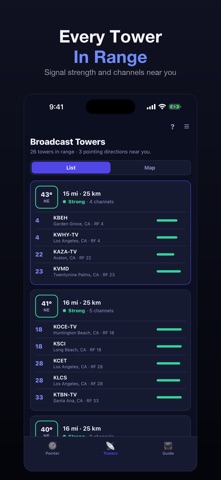
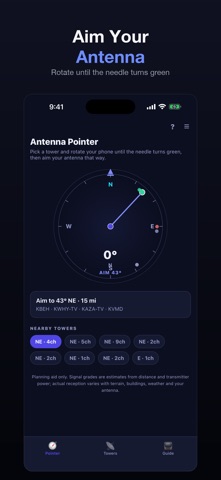
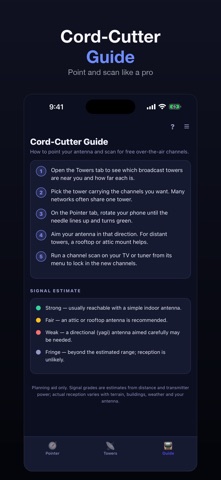
▶ Point your TV antenna the right way. TV Antenna Pointer lists the broadcast towers around you, sorted by distance, with the channels, network and direction for each one. ▶ Spin to the signal. Pick a tower or a whole cluster and the compass arrow turns you to the exact heading, with a nudge when you are lined up. Several channels on one tower farm show as one aim point. ▶ See it on the map. Your location, the towers and the bearing lines are drawn together so you can double-check the direction even where indoor metal throws the compass off. ▶ New to cutting the cord? After you aim, the app walks you through rescanning your TV so those over-the-air channels actually show up. ▶ Works offline from a built-in tower database, so you can check reception anywhere. No account needed. Reception estimates are based on distance, tower power and your location; real results vary with terrain, buildings, antenna type and weather. Directions are a guide — final aiming is best confirmed by your TV's signal meter.
Latest release
What’s New
The app no longer asks for location while the opening screen is still up. Three system prompts used to stack there at once, which made the first launch feel stuck; the location request now waits until you reach the tower list. The exit confirmation is also plain again, with nothing else competing for the tap.
Audience growth
Ratings growth
Baseline captured. Growth appears after the crawler observes a changed rating count.
Momentum comes from crawler snapshots for the tracked storefront. “Viral growth signal” means unusually fast recent rating gains; it is an indicator, not download data.
Price tracking
Price intelligence
First snapshot captured. The trend line starts after the next crawler price observation.
- First observed Aug 19, 2026 · 5:55 PM Free
Screenshots