About this app
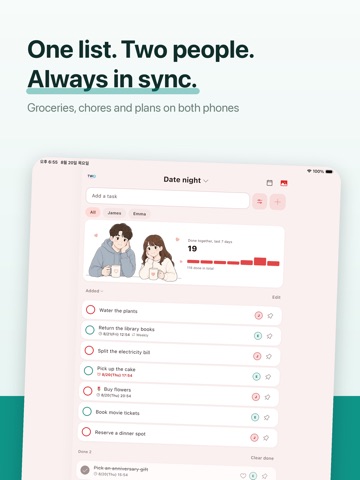
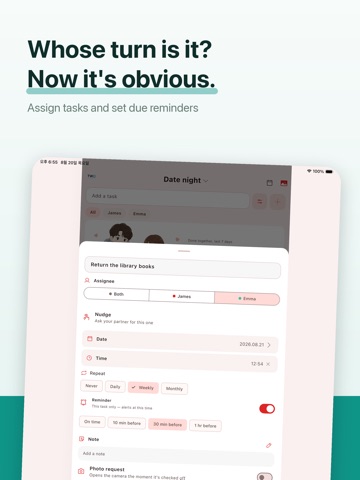
Stop texting each other chores. TwoDo is one shared to-do list for two people — couples, partners, roommates. It shows up on both lock screens, and either of you can check things off without opening the app. No sign-up, no email. One 6-character code connects you both in under a minute. Lock screen widget Your tasks are there the moment you pick up your phone. Tap to complete. Real-time sync When your partner adds or finishes something, your widget updates right away. Works between iPhone and Android. Assign each task Mark a task as yours, theirs, or unassigned, so you both know who has it. Due reminders Set a reminder time per task — nothing slips through. All-day tasks keep the date without inventing a time, and you can turn any reminder off. Questions? Message us in the app Send feedback is a chat. Support replies directly, and a notification tells you when the answer arrives. Free, with no purchase The shared list, the widget, real-time sync, assignees, due reminders, all-day due dates, sorting, your anniversary D-day, everything you have finished together, and sharing your all-time record as an image. Pro (optional, one-time) Pro is not a subscription. A single lifetime purchase unlocks nudge, multiple lists (up to 6), your own order (drag to arrange, pin to the top), calendar view, our report (your rhythm over the last 7 days), colors you make yourself, widget skins, notes on your tasks, a Live Activity that shows several to-dos right on your Lock Screen, and your own photo on the summary card. One of you buys it, and both of you get it. Our Album (optional, subscription) Snap a photo when you finish a to-do — the moment lands in a shared album, month by month. Try 3 photos free; keep going with a subscription ($2.99/month or $14.99/year, up to 100 photos a month). If it ever lapses, everything you saved stays viewable. On the 1st of each month, a monthly recap arrives — last month on one card: totals, who did what, best day, and that month's photos. While it is active, nudge, calendar view, our report, notes, and your photo on the card are unlocked too. Built for two. Nothing you don't need. Terms of Use (EULA): https://www.apple.com/legal/internet-services/itunes/dev/stdeula/
Latest release
What’s New
• Fixed the calendar failing to open where daylight saving time is used. • "No tasks yet" no longer flashes while the app is still loading. • Fixed the album looking empty while you were viewing it. • 12-hour times now put AM/PM where your language expects it. • Fixed the pause when adding the widget, and notifications opening the wrong list. • Fixed gift purchases not returning a code. • Other stability and speed fixes.
Audience growth
Ratings growth
Baseline captured. Growth appears after the crawler observes a changed rating count.
Momentum comes from crawler snapshots for the tracked storefront. “Viral growth signal” means unusually fast recent rating gains; it is an indicator, not download data.
Price tracking
Price intelligence
First snapshot captured. The trend line starts after the next crawler price observation.
- First observed Sep 8, 2026 · 8:15 PM Free
Screenshots