About this app
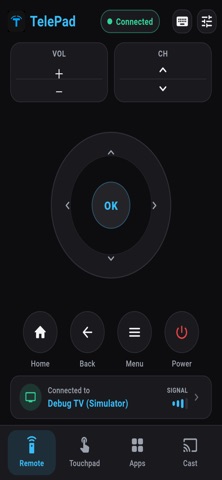
Say goodbye to lost plastic remotes and the clutter on your coffee table! TelePad turns your iPhone into a powerful, universal Smart TV remote control. Whether you want to control your TV over WiFi, navigate using a smooth touchpad, or cast your local photos and videos to the big screen, TelePad has got you covered. KEY FEATURES - Universal Compatibility: Works seamlessly with leading global Smart TV brands including Samsung, LG, Roku, Sony, Fire TV, Vizio, TCL, Hisense, and many more. - Smart Connection: Automatically detects and connects to your Smart TV or streaming device within the same local Wi-Fi network. - Advanced Touchpad Mode: Navigate your TV interface with absolute ease! Move the cursor, swipe, scroll, and tap with fluid gesture controls. - TV App Launcher: Browse and launch installed TV applications like Netflix, YouTube, Prime Video, Disney+, and more, directly from your phone screen. - Media Casting (Cast): Instantly stream high-quality local photos and HD videos from your device gallery straight to the TV screen to share with friends and family. - Essential Controls: Full simulation of a physical remote including Power ON/OFF, volume adjustments (+/-), channel switching, mute, menu, back, and home navigation. WHY CHOOSE TELEPAD? - Zero Configuration: Open the app, scan via Wi-Fi, and connect. No complex setups or pairing codes are required. - Ultra-Low Latency: High-speed transmission within the local network ensures real-time command execution without freezes or lag. - All-in-One Tool: Combines classic directional keys, an intelligent touchpad, a TV app hub, and a screen casting tool into one modern interface. - Elegant Dark UI: Designed with a premium dark interface that reduces eye strain, optimized for late-night usage in the living room. HOW TO USE 1. Ensure your iPhone and Smart TV / streaming device are connected to the exact same Wi-Fi network. 2. Open TelePad and allow access to detect devices on your local network. 3. Select your TV from the list of discovered devices to establish a connection. 4. Enjoy full touch and button control over your entertainment system! PRIVACY AND COMPLIANCE TelePad strictly respects user privacy. The local network permission is requested by iOS only to perform a local Wi-Fi scan and discover nearby smart devices. We do not track, collect, or share your personal data or network history with third parties. Download TelePad today and experience the most modern and convenient way to control your home theater!
Latest release
What’s New
Fixed known issues and improved stability.
Audience growth
Ratings growth
Baseline captured. Growth appears after the crawler observes a changed rating count.
Momentum comes from crawler snapshots for the tracked storefront. “Viral growth signal” means unusually fast recent rating gains; it is an indicator, not download data.
Price tracking
Price intelligence
First snapshot captured. The trend line starts after the next crawler price observation.
- First observed Aug 10, 2026 · 8:27 AM Free
Screenshots