About this app
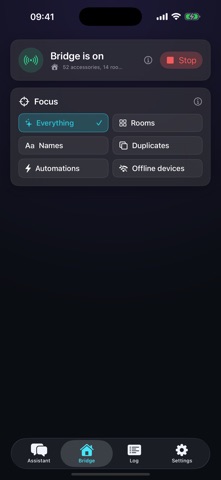
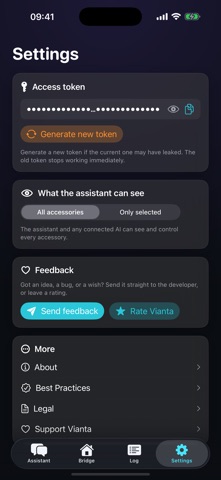
Vianta turns your Apple Home into a living floor plan, with an AI organizer that runs right on your iPhone and iPad. THE ROOM MAP See your whole home at a glance: every light, lock, thermostat, and sensor placed where it really is. Rooms glow when something is on. Tap a device to control it. Drag a device to another room and Vianta moves it in Apple Home too. Draw your walls, add floors, mark the pantry and stairs, or let the built-in AI lay the map out for you. YOUR HOME, ORGANIZED HomeKit setups get messy: cryptic accessory names, devices in the wrong rooms, duplicates, gadgets that stopped responding. Ask Vianta in plain words: "what's in my kitchen," "rename the den lamp to Reading Light," "move the thermostat to the bedroom." Nothing changes until you approve it. PRIVATE BY DESIGN Everything runs on your device. The assistant uses Apple's on-device model, and your home data never leaves your device. No account, no cloud, no tracking. If you turn on Room Map iCloud sync (off by default), only your map layout syncs through your own iCloud. WHAT YOU CAN DO - Control lights, locks, thermostats, fans, shades, and scenes straight from the map - Rename accessories and rooms in plain language, with approval before every change - Find duplicates, offline devices, and clutter fast - Mirror floors to Siri zones so "the downstairs lights" just works - Works with everything already in your Apple Home Vianta needs a configured Apple Home. The assistant requires a device with Apple Intelligence.
Latest release
What’s New
The Room Map: your whole home, one live map. - A living floor plan of your Apple Home: every device where it really is, and rooms glow when something is on - Tap any device to control it; drag one to another room and Vianta updates Apple Home too - Draw walls, add floors, mark the pantry and stairs, or let the built-in AI lay out the map for you - Optional iCloud sync keeps your map on all your devices (off by default) - Cleaner device cards, scroll hints, and plenty of small fixes
Audience growth
Ratings growth
Baseline captured. Growth appears after the crawler observes a changed rating count.
Momentum comes from crawler snapshots for the tracked storefront. “Viral growth signal” means unusually fast recent rating gains; it is an indicator, not download data.
Price tracking
Price intelligence
First snapshot captured. The trend line starts after the next crawler price observation.
- First observed Aug 8, 2026 · 5:05 PM Free
Screenshots