About this app
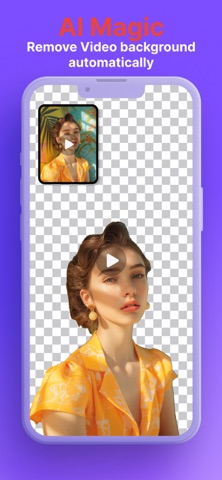
Experience the magic of one-click AI background removal, now supercharged with a full suite of powerful video editing tools! PixelZap automatically erases backgrounds from any video, image, or GIF, then lets you perfect your creation—all in one seamless app. Stop juggling complex software. From viral social media clips to professional product shots, PixelZap is the only tool you need to create stunning content, effortlessly. The AI Magic Suite: Your Creative Powerhouse AI Video Background Remover & Chroma Key: Instantly remove or replace video backgrounds (MP4, MOV, AVI, MKV). Achieve studio-grade green screen (Chroma Key) effects without a physical setup, or create transparent video overlays for a pro look. Perfect for YouTube videos, TikTok content, Instagram Reels, and professional video production. Photo Background Remover & Image Editor: Erase photo backgrounds with perfect precision using advanced AI technology. Ideal for creating transparent PNGs for e-commerce, product photography, logos, profile picture cutouts, passport photos, and social media posts. GIF Background Eraser & Animated Sticker Maker: Make your animated GIFs pop! Remove or change GIF backgrounds to create hilarious memes, custom stickers for WhatsApp, Telegram, Discord, and unique social media replies. The Complete Video Editing Toolkit Video Trimmer & Cutter: Trim the clutter. Easily cut long videos into perfect clips for Instagram Reels, TikTok videos, YouTube Shorts, Facebook posts, and Twitter content. Video Cropper & Resizer: Frame it perfectly. Crop and resize your video to fit any social media aspect ratio—square (1:1), vertical (9:16), horizontal (16:9), or custom dimensions for any platform. Video Compressor & Optimizer: Reduce large video file sizes without losing quality. Share faster, save storage space, and optimize for web upload. Video Format Converter & Transcoder: Convert files to MP4, MOV, AVI, WMV, FLV, and more, ensuring perfect playback on any device or platform. Video Merger & Joiner: Combine multiple video clips into one seamless movie. Perfect for creating compilations, tutorials, and storytelling content. Essential Audio Tools Video to MP3 Converter & Audio Extractor: Extract high-quality audio from any video format. Save theme songs, voiceovers, podcasts, music, or create audio snippets for your projects. Perfect For: Content Creators & Influencers: Use AI Chroma Key for gaming streams, vlogs, tutorials, then trim & merge footage for perfect YouTube, TikTok, and Instagram uploads. E-commerce Owners & Marketers: Get crisp, clean product photos with transparent backgrounds and edit engaging promo videos for Amazon, Shopify, and online stores. Social Media Managers & Digital Marketers: Produce professional ads in minutes. Remove backgrounds, crop for every platform, and compress for fast loading across Facebook, Instagram, LinkedIn, and Twitter. Why Choose PixelZap? The True All-in-One Video Editor: One app replaces your background remover, video trimmer, merger, compressor, audio extractor, and photo editor. AI Magic Meets Simple Editing: Get industry-leading AI results with zero manual work, paired with an incredibly intuitive editor. No complex timelines or steep learning curves! Fast, Accurate & High-Quality Processing: Experience rapid processing for everything—from instant background removal to lossless compression and HD output. Cross-Platform Compatibility: Works with all major video formats, image types, and audio files. Export in any format you need. From AI magic to final cut, PixelZap is the only media editor you'll ever need. Download now and unleash your creative power! Automatic Subscription Service: Monthly Subscription: $5.99/month Yearly Subscription: $14.99/year (Prices may vary by country and are subject to the actual price within the app) Related Policy Links: Privacy Policy: https://michaelzhang1994.github.io/pixelzap_privacy Terms of Use: https://michaelzhang1994.github.io/pixelzap_user
Latest release
What’s New
- New Feature: Support adding a stroke to GIFs with removed backgrounds. - New Feature: Support adding a stroke to Videos with removed backgrounds. - Bug fixes & performance optimizations
Audience growth
Ratings growth
Baseline captured. Growth appears after the crawler observes a changed rating count.
Momentum comes from crawler snapshots for the tracked storefront. “Viral growth signal” means unusually fast recent rating gains; it is an indicator, not download data.
Price tracking
Price intelligence
First snapshot captured. The trend line starts after the next crawler price observation.
- First observed Aug 28, 2026 · 5:56 AM Free
Screenshots