About this app
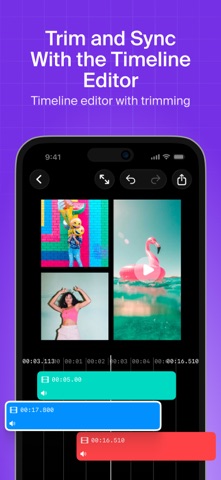
Put your videos side by side. Video Grid Collage combines up to 9 clips into one frame — perfect for reactions, before & after edits, comparisons, and multi-angle stories. No learning curve: pick a layout, drop in your clips, customize, export. Done in a minute. WHY CREATORS PICK IT – Up to 9 videos in one grid, with a wide choice of layout styles – Timeline editor: trim clips, set in/out points, control when each video plays – Text layers: add and move text anywhere on the collage – Animations for grid items and text – Any format: square 1:1 for feed, vertical 9:16 for Reels, TikTok and Shorts, 16:9 for YouTube – Fine-tune everything: background color, spacing, padding, rounded corners – Import from Photos or iCloud Files – High-quality export, ready to share MADE FOR – Reaction and commentary videos – Before & after transformations – Multi-angle vlogs and travel recaps – Product demos and reviews – Duets, collabs and couple videos – Fitness progress and tutorials PRO TIP Start with a simple 2-frame side by side — it is the fastest way to make a comparison video that stops the scroll. Video Grid Collage is free to download. Optional purchases remove the watermark and unlock Pro features. We ship updates almost every week — send us your ideas and we will build them. Terms of use https://www.apple.com/legal/internet-services/itunes/dev/stdeula/
Latest release
What’s New
Hey, Video Grid Collage becomes even better! In this release we've fixed issues reported by our users. Thanks for the support, enjoy! WHAT'S NEW IN 3.x – HDR video – Crop — adjust video position inside grid – Text Layers — type anywhere on your video, no grid limits – Animations — bring grids and text to life – Timeline Editor — trim clips with frame precision – Engine Boost — faster, smoother editing on every iPhone
Audience growth
Ratings growth
Baseline captured. Growth appears after the crawler observes a changed rating count.
Momentum comes from crawler snapshots for the tracked storefront. “Viral growth signal” means unusually fast recent rating gains; it is an indicator, not download data.
Price tracking
Price intelligence
First snapshot captured. The trend line starts after the next crawler price observation.
- First observed Aug 22, 2026 · 1:52 AM Free
Screenshots