About this app
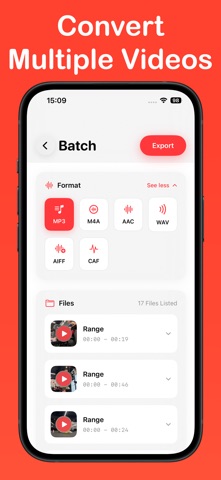
Save audio from your videos with "Video to mp3 converter offline" Pick one video or many from Photos or Files, choose MP3 (or M4A/AAC/WAV/AIFF), trim if you want, then save or share in seconds. How it works • Open the app and choose videos from Photos or Files. • Convert a single video or select multiple at once. • Pick your audio format (MP3, M4A, AAC, WAV, AIFF). • Save to your device or share with other apps (AirDrop, Messages, Mail, cloud). Features • On-device conversion — works offline, no uploading. • Batch conversion for multiple files. • Trim & preview before saving. • Background playback with lock-screen controls. • Make a ringtone from your clip. • History to find and re-share past conversions. Privacy & storage All conversions happen on your device. Nothing is uploaded by default. You choose where files are saved. If you want a simple offline tool to extract audio from video files, try "Video to mp3 converter offline". To save and share converted audio files, a subscription is required: - Weekly: $3.99 USD (3-day free trial) - Lifetime: $14.99 USD Premium features: - Save and share - Unlimited conversions - Batch process multiple videos - No restrictions or limits Terms of Use: https://www.apple.com/legal/internet-services/itunes/dev/stdeula Privacy Policy: https://img2pdf.org/privacy-policy/
Audience growth
Ratings growth
Baseline captured. Growth appears after the crawler observes a changed rating count.
Momentum comes from crawler snapshots for the tracked storefront. “Viral growth signal” means unusually fast recent rating gains; it is an indicator, not download data.
Price tracking
Price intelligence
First snapshot captured. The trend line starts after the next crawler price observation.
- First observed Aug 11, 2026 · 1:13 PM Free
Screenshots