About this app
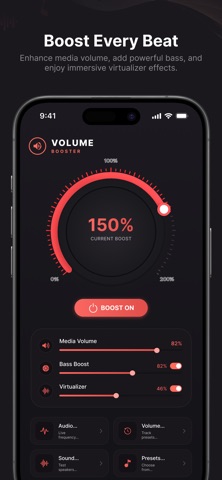
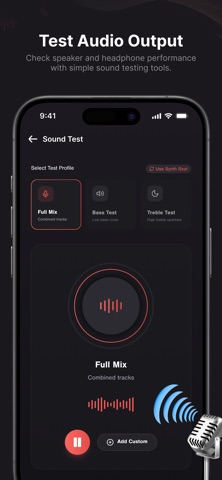
Discover a smarter way to personalize your audio experience. Volume Booster GOODEV combines advanced sound controls with useful audio tools, helping you tailor music, videos, podcasts, and more to match your listening style. Whether you prefer powerful bass, balanced vocals, or crisp high frequencies, the app gives you flexible controls in a clean and intuitive interface. Audio Features Sound Enhancement Adjust your audio with controls designed to optimize your listening experience for compatible media playback. Bass Boost Add extra depth and warmth to supported audio for a fuller sound. Virtualizer Create a more spacious audio effect when using compatible headphones or speakers. 5-Band Equalizer Fine-tune individual frequency ranges to create your own custom sound profile. Built-in Equalizer Presets Switch instantly between carefully crafted presets: • Normal • Pop • Rock • Jazz • Dance • Classic • YoYo Manual Frequency Adjustment Take complete control by customizing each frequency band exactly the way you like. Smart Audio Tools Audio Analyzer View real-time audio frequency activity while media is playing. Volume History Review previous volume changes to better understand your listening preferences. Sound Test Check speaker performance and verify audio output with simple sound testing tools. Device Care Quick Cleaner Remove temporary files and free up storage with a fast cleanup. Deep Clean Scan for unnecessary cached data to help keep your device organized. Designed for Everyday Listening • Modern and easy-to-use interface • Fast access to audio controls • Custom equalizer settings • Multiple listening presets • Real-time audio visualization • Smooth performance for daily use Volume Booster GOODEV is built for users who enjoy customizing their sound experience with practical audio controls and useful utility features in one convenient app. Disclaimer: Available audio effects and enhancement features may vary depending on your iPhone model, connected audio devices, media source, and the capabilities provided by iOS.
Audience growth
Ratings growth
Baseline captured. Growth appears after the crawler observes a changed rating count.
Momentum comes from crawler snapshots for the tracked storefront. “Viral growth signal” means unusually fast recent rating gains; it is an indicator, not download data.
Price tracking
Price intelligence
First snapshot captured. The trend line starts after the next crawler price observation.
- First observed Aug 20, 2026 · 2:02 AM Free
Screenshots