About this app
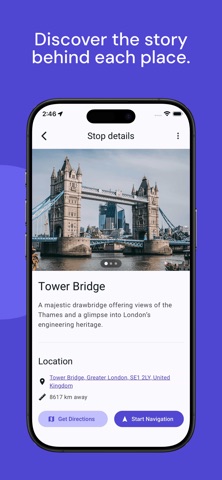
Wandr is a compass-based city exploration app. Instead of following turn-by-turn directions, Wandr simply points you toward your destination and lets you find your own way. No rigid routes. No constant phone checking. Just a direction — and the freedom to explore. Whether you're traveling somewhere new or rediscovering your own city, Wandr turns navigation into an experience of discovery. --- Compass Navigation Pick a destination and Wandr shows you the direction and distance. There are no step-by-step instructions telling you where to turn. Walk toward your destination and explore naturally along the way. It’s navigation designed for curiosity, not efficiency. --- Discover Places Search for landmarks, cafés, viewpoints, museums, and more. Wandr points you in the right direction so you can wander through streets, neighborhoods, and hidden spots you might otherwise miss. --- Community Walking Guides Explore routes created by locals and travelers. Follow curated guides through cities — from historic walks to food routes — and experience places through the paths others have shared. --- Create Your Own Routes Build and share your own walking guides. Add places you love, organize them into routes, and share them with others. Start from an existing guide or create one from scratch. --- Built for Calm Exploration Wandr is designed to help you spend less time staring at your phone and more time experiencing the city around you. No ads. No algorithmic feeds. Just simple tools to explore. --- Find your own direction. Download Wandr and explore cities differently.
Latest release
What’s New
- Improved: Compass, Stop Lists, and Navigate now use one on‑device walking‑time model (straight‑line segments + typical detour factor + your ETA buffer) for consistent estimates without network routing. - New: Tap the help icon next to walking estimates for a short explanation. - Improved: Auto‑sort now reorders the full itinerary using the same walking‑time logic, with fairer handling when stops are equally distant. - Removed: The old “compass distance mode” setting—unified estimates replace the separate straight‑line vs routed options.
Audience growth
Ratings growth
Baseline captured. Growth appears after the crawler observes a changed rating count.
Momentum comes from crawler snapshots for the tracked storefront. “Viral growth signal” means unusually fast recent rating gains; it is an indicator, not download data.
Price tracking
Price intelligence
First snapshot captured. The trend line starts after the next crawler price observation.
- First observed Sep 4, 2026 · 12:41 AM Free
Screenshots