About this app
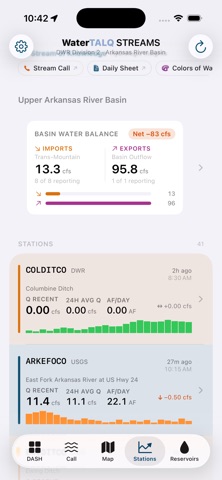
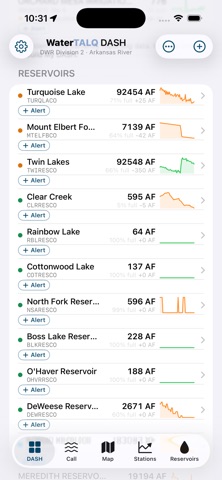
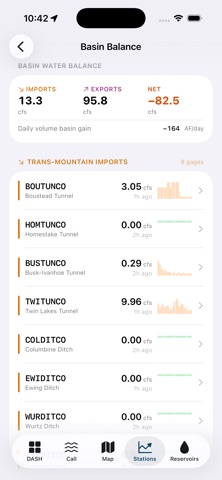
WaterTALQ Ark•UP puts Colorado's Arkansas River Basin (Water Division 2) at your fingertips — live administrative calls, decreed water rights, gaging-station flows, and reservoir storage, built directly on Colorado Division of Water Resources (DWR) data. Whether you're a water-rights professional, a ditch rider, a headgate operator, or just learning how Colorado's prior-appropriation system works, Ark•UP helps you answer one question fast: where do I stand in line, right now? TALQ = Time · Amount · Location · Quality. WHAT YOU CAN DO • Know your priority — see the current administrative call on your stream and whether a structure is in or out of priority, including split-call reaches on the main stem. • Build your DASH — a personal watchlist of water rights, stations, and reservoirs across Divisions 1, 2, and 5, with live status, 7-day trends, and one-tap links to DWR's live data pages. • Track real-time conditions — flow, 24-hour average flow, daily volume, water and air temperature, conductivity, and precipitation from DWR, USGS, and USBR stations. • Watch reservoirs — live storage, percent full, and 24-hour / 1-week change. Add any DWR reservoir and Ark•UP looks up its capacity automatically from the state's dam inventory. • Set threshold alerts — get notified the moment any station or reservoir you follow crosses a value you choose. • Stay current — the built-in Water Rights Data Engine refreshes every Division 2 decreed right straight from DWR monthly, or on demand. • Explore the map — find decreed structures near you, see the calling reach, and open structures on CDSS. • Search every structure — look up any decreed right by name, WDID, or water district, with appropriation dates, administration numbers, decree history, and diversion records. BUILT ON OFFICIAL DATA Ark•UP reads directly from Colorado's Decision Support Systems (CDSS) / DWR REST API, USGS, and USBR. It changes no official record — it's a fast, mobile window into public data, with clear notes where a structure is administered by exception. If data can't load, Ark•UP says "Status Unavailable" — it never guesses. WHO IT'S FOR Water-rights owners and consultants, conservancy and conservation districts, ditch and reservoir companies, water commissioners, engineers, and anyone learning Colorado's prior-appropriation ("first in time, first in right") system. New to water rights? Demo Mode lets you explore the full app with sample data. From headwaters to headgate — know your priority, in real time. Ark•UP is the Arkansas Basin edition of WaterTALQ, maintained by SourceWater Consulting. It is an independent tool and is not endorsed by the Colorado Division of Water Resources. Subscriptions auto-renew until cancelled; the 1 Week Pass is a one-time purchase. Privacy Policy: https://www.sourcewater.us/privacy-policy — Terms of Use (EULA): https://www.apple.com/legal/internet-services/itunes/dev/stdeula/
Latest release
What’s New
Maps, one-tap refresh, and cleaner data rows. LOCATION MAPS — Every stream gauge and reservoir now includes a location map on its detail page. Tap to expand a full-screen map with a satellite view, or jump straight to the main Map tab to see the gauge alongside your water rights and active call reaches. Maps load instantly, even offline. DASH REFRESH — A refresh button at the top of your DASH updates everything at once: the controlling call, priority statuses, station flows, reservoir storage, and 7-day trends — with a timestamp so you always know how fresh your data is. EASIER READING AT A GLANCE — Station rows now lead with the latest flow as a big, bold number, with 24-hour average and daily volume beside their labels — matching the reservoir layout. Air temperature, water temperature, and conductance now appear on station and reservoir rows wherever gauges report them. POLISH — Values no longer wrap or truncate at any text size setting, and tighter spacing fits more of your water on screen. Questions or a gauge that looks off? We'd love to hear: info@sourcewater.us
Audience growth
Ratings growth
Baseline captured. Growth appears after the crawler observes a changed rating count.
Momentum comes from crawler snapshots for the tracked storefront. “Viral growth signal” means unusually fast recent rating gains; it is an indicator, not download data.
Price tracking
Price intelligence
First snapshot captured. The trend line starts after the next crawler price observation.
- First observed Aug 16, 2026 · 7:23 PM Free
Screenshots