About this app
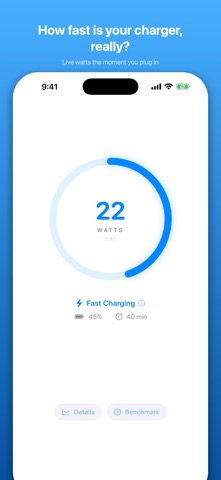
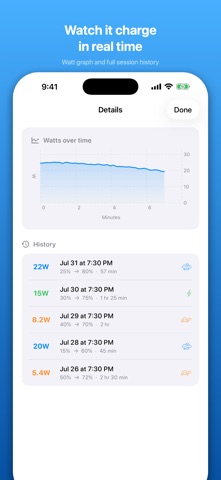
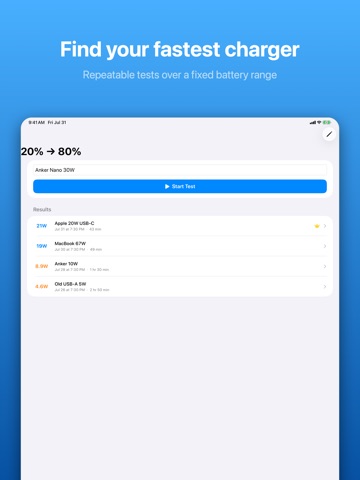
How fast is your charger, really? Plug in your iPhone or iPad and Watt Charging Speed shows you a live estimate of your charging power in watts — so you can tell a fast charger from a slow one, and find out whether your cable actually supports fast charging. HOW IT WORKS — HONESTLY iPhone and iPad don't give apps access to a hardware power meter. Instead, Watt Charging Speed estimates wattage by tracking how quickly your battery level rises, combined with your device's exact battery capacity. That means: • Readings are careful estimates, not direct measurements • Your first reading appears after a few minutes of charging • The longer the app stays open while charging, the more accurate it gets LIVE CHARGING SPEED • Live wattage estimate while charging • Color-coded speed indicator: Fast, Normal, Slow, or Trickle • Animated charging ring and live session graph • Estimated time until fully charged BENCHMARK YOUR CHARGERS • Create battery range tests (e.g. 30% → 80%) and time them precisely • Compare chargers and cables under identical conditions • See which charger actually performs best CHARGING HISTORY • Automatic session tracking with average watts, duration, and battery range • Compare sessions over time to spot slow cables or aging chargers PRIVATE BY DESIGN • No ads, no tracking, no accounts • All data stays on your device • Works completely offline GOOD TO KNOW iOS pauses background apps, so keep Watt Charging Speed open while it measures — it keeps your screen awake during a session so nothing is interrupted. Perfect for testing a new charger, diagnosing slow charging, or finally settling which of your cables belongs in the drawer.
Latest release
What’s New
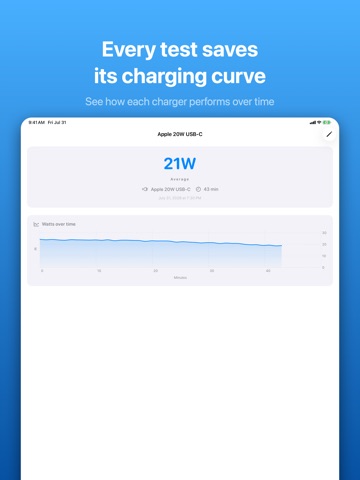
Charging just got more insightful: • Watt graph for every benchmark result — see how each charger performed over time • Rename benchmark tests and charger labels • Haptic feedback when you plug in, complete a benchmark, or save a session • Smoother graphs during long sessions, improved translations, and bug fixes
Audience growth
Ratings growth
Baseline captured. Growth appears after the crawler observes a changed rating count.
Momentum comes from crawler snapshots for the tracked storefront. “Viral growth signal” means unusually fast recent rating gains; it is an indicator, not download data.
Price tracking
Price intelligence
First snapshot captured. The trend line starts after the next crawler price observation.
- First observed Aug 26, 2026 · 5:44 PM $1.99
Screenshots