About this app
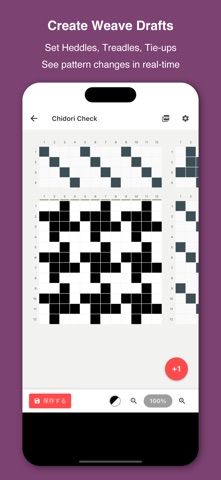
Weave Designer is an app that allows you to easily create and edit weaving drafts used in hand weaving directly on your smartphone. By setting the shafts, treadles, and tie-up, you can simulate complex weaving patterns (drawdowns) in real time. Because you can visually review and fine-tune your drafts as you work, it becomes much easier to imagine the finished fabric before doing a test weave. The app lets you design while understanding the structure of the weave, making it useful for everyone from beginners to experienced weavers. In addition, its smartphone-friendly interface allows you to quickly turn ideas into designs anytime—whether you’re on the go or taking a short break during your work. [Key Features] - Create Weave Drafts: Intuitively edit threading, tie-ups, and treadling with simple tap operations. - Real-time Preview: Instantly see how changes affect the weave pattern. - Thread Color Settings: Customize individual colors for both warp and weft threads. - Flexible Customization: Freely configure the number of heddles, weaving width, and treadles to match various looms. - PDF Export: Save, share, and print your weave drafts as PDF files. [Basic Usage] 1. Set the number of heddles and weaving width when creating a new design. 2. Tap the grids to input threading and tie-ups. 3. Use the "+" button at the bottom right to add weft rows and select the treadle to use. 4. Use the magnifying glass buttons to zoom in/out and check the overall pattern.
Latest release
What’s New
Thank you for using Weave Designer. We have improved stability and performance to make your design experience even better.
Audience growth
Ratings growth
Baseline captured. Growth appears after the crawler observes a changed rating count.
Momentum comes from crawler snapshots for the tracked storefront. “Viral growth signal” means unusually fast recent rating gains; it is an indicator, not download data.
Price tracking
Price intelligence
First snapshot captured. The trend line starts after the next crawler price observation.
- First observed Aug 20, 2026 · 12:20 AM Free
Screenshots