About this app
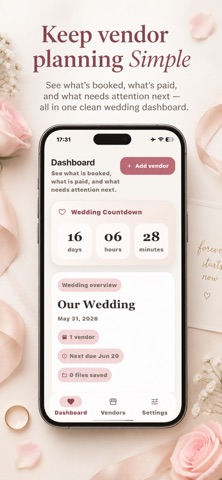
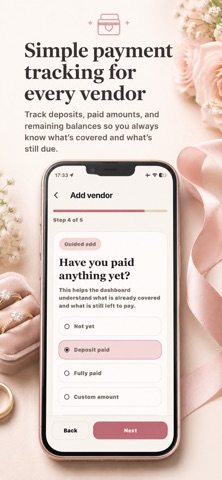
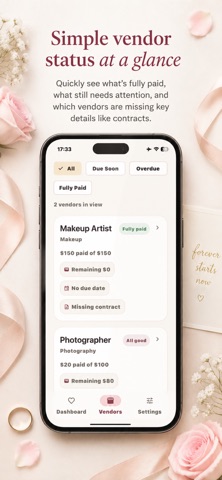
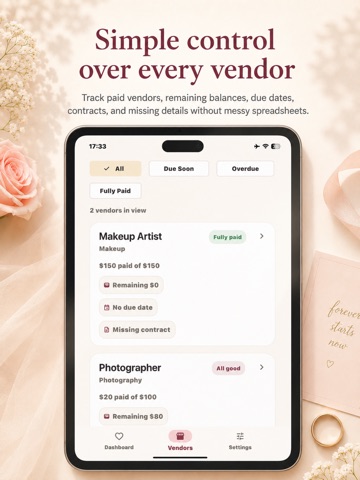
Wedding Vendor Tracker helps you organize wedding vendors, payments, deposits, contracts, receipts, notes, and due dates in one simple app. Track what you paid, what you still owe, and which vendor payment is coming next without messy spreadsheets. Planning a wedding often means dealing with many vendors at once: venue, photographer, videographer, florist, catering, cake, music, beauty, rentals, transportation, and more. Wedding Vendor Tracker gives you a clear place to manage vendor costs, payment deadlines, contract files, receipts, and important notes from your iPhone. Add a vendor quickly, enter the total cost, record what you already paid, and set the next payment due date when needed. The app calculates paid and remaining balances, shows upcoming payments, and helps you stay organized as the wedding gets closer. Track Your Wedding Vendors Create simple vendor cards for every part of your wedding: Venue Photographer Videographer Florist Catering Cake DJ or music Hair and makeup Dress and attire Rentals Transportation Planner or coordinator Other wedding vendors Each vendor can include cost details, payment status, due dates, attachments, and notes. Keep the core details simple, then add more only when you need it. Manage Payments, Deposits, and Balances Wedding Vendor Tracker is built to help you answer the most important money questions: Which vendors have I booked? How much did I agree to pay? How much have I already paid? What balance is still remaining? Which payment is due next? Which vendors are fully paid? Track deposits, installments, final balances, and custom payment dates. Mark payments as paid, add notes, and keep a clearer view of your wedding vendor budget. Save Contracts, Receipts, and Files Keep important vendor documents close to the vendor they belong to. Add contracts, receipts, invoices, quotes, photos, or other files so you do not have to search through email, messages, folders, and camera roll when you need proof. You can upload a file, add an image, or take a photo directly from your phone. Notes and Reminders Every wedding has small details that do not fit perfectly into a spreadsheet. Use notes for contract details, special requests, cancellation terms, payment arrangements, family contributions, questions to ask, or anything else you want to remember. Add due dates and reminders so important vendor payments and deadlines do not get lost during the planning process. Simple Wedding Dashboard See your wedding vendor progress at a glance: Total vendor cost Paid so far Remaining balance Next payment due Upcoming vendor payments Overdue payments Saved contracts and receipts The dashboard is designed to feel calm, friendly, and practical, helping you stay in control without making wedding planning feel more stressful. Export and Share Create a clean vendor or payment summary when you need to share details with your partner, planner, coordinator, parent, or your own records. Use exports to keep a backup, review upcoming payments, or bring a simple summary to wedding planning conversations. Designed for Fast Wedding Planning Wedding Vendor Tracker is not a complicated all-in-one wedding planner. It is focused on one important job: helping you manage wedding vendors, payment due dates, contracts, receipts, and notes in a faster, easier way. Use it to replace scattered spreadsheets, screenshots, notes, emails, and paper folders with one organized vendor tracker. Privacy-Friendly and Local First Your wedding vendor information is stored on your device. No login is required to start organizing your vendors. Free to Start Start tracking your first vendors for free. Unlock Lifetime Pro for more vendors and extra features when you are ready. Download Wedding Vendor Tracker and keep your wedding vendors, payments, deposits, contracts, receipts, and due dates organized from one simple place. Terms of Use (EULA): https://www.apple.com/legal/internet-services/itunes/dev/stdeula/
Audience growth
Ratings growth
Baseline captured. Growth appears after the crawler observes a changed rating count.
Momentum comes from crawler snapshots for the tracked storefront. “Viral growth signal” means unusually fast recent rating gains; it is an indicator, not download data.
Price tracking
Price intelligence
First snapshot captured. The trend line starts after the next crawler price observation.
- First observed Aug 24, 2026 · 12:12 AM Free
Screenshots