About this app
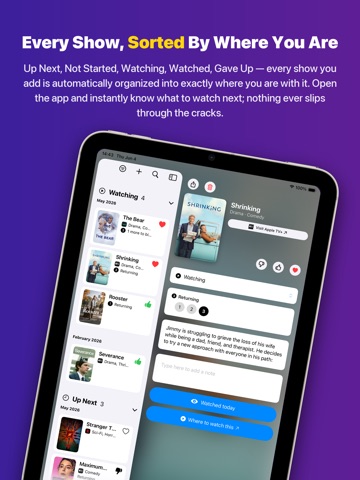
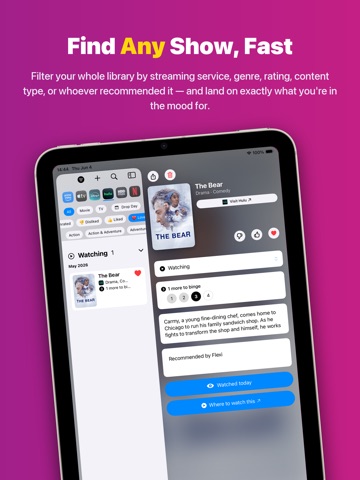
Ever forget what you were watching? Or which streaming service it was on? It happens to all of us — juggling recommendations, hopping between apps, or trying to remember that one show you meant to start. What Was I Watching is a warm, simple place to keep track. No accounts. No setup. No pressure. Just open it and jot down what you're watching or what you want to watch next. Adding a show is just typing Type a title — even a few words — and the app finds it, filling in the poster, genres, and details for you. That's the whole flow. Rather snap than type? Turn on photo capture in Settings to add a show from a picture of your TV, a poster, or a screenshot. Track Every State Mark a show as Watching, Binge, Watched, or Gave Up — your list always reflects where you really are. Rate the ones you loved. Your list becomes a clean, friendly collection you can browse anytime, organized by state, date, genre, or streaming service. Filter by movies or TV, by genre, or by who recommended it. Track Your Seasons Watching a series? The app tracks which season you're on and tells you when the next one is due. When a new season drops, just tap to move forward. Designed for Everyone Full VoiceOver and Voice Control support, Dynamic Type, high-contrast and reduced-motion modes, and clear labels throughout — the whole app is built to be used by everyone. Made for iPad A real iPad layout, not a stretched-up phone — browse your list and show details side by side. Want to share a show with a friend? Send them a link. They tap it, and the show opens right in the app, ready to add. It's fast — shared shows load instantly with full details. Ask Siri "Hey Siri, what was I watching?" Get a natural spoken summary of your list, grouped by streaming service. Sync Across Your Devices Add a show on your iPhone, see it on your iPad. iCloud keeps everything in sync automatically. Widgets on iPhone Keep your recent shows right on your Home Screen. A quick glance is all it takes to remember what you were watching. Apple Watch App Check your list from your wrist. Perfect for those "what was that show again" moments when your phone is not nearby. Watch Widgets Your latest shows, right in the Smart Stack. Fast, simple, and always within reach. Your Streaming Services Tell the app which services you use. It helps you keep track of where each show was streaming. Your Privacy No account. No ads. No tracking. Your watch history stays on your device and in your private iCloud. Features: Add a show just by typing Watching / Binge / Watched / Gave Up states, plus personal ratings Smart lookup fills in poster art, genres, and details Optional photo capture — add from a picture (enable in Settings) Season tracking with next-season dates Filter by streaming service, genre, content type, state, or who recommended it Share shows with friends using simple links Universal links: tap a shared link to open a show Ask Siri about your watch history iPad-optimized layout Full VoiceOver / Voice Control / Dynamic Type accessibility iPhone Home Screen widget Apple Watch app Watch widgets in the Smart Stack iCloud sync across all your Apple devices Fully offline capable (Images in screenshots are simulated - actual images are much better)
Latest release
What’s New
What Was I Watching 2.0 — our biggest update yet. Made for iPad A real iPad layout with your list and show details side by side — not a stretched-up phone. Built for Everyone Full VoiceOver and Voice Control support, Dynamic Type, high-contrast and reduced-motion modes, and clear labels everywhere. Track Every State Mark shows as Watching, Binge, Watched, or Gave Up, and rate the ones you loved. Your list is now organized by where you actually are. Redesigned Cleaner, friendlier home and show screens that are faster to scan. Smarter Seasons See when the next season is due and tap to move forward. Plus dozens of refinements and fixes. Thanks for watching.
Audience growth
Ratings growth
Baseline captured. Growth appears after the crawler observes a changed rating count.
Momentum comes from crawler snapshots for the tracked storefront. “Viral growth signal” means unusually fast recent rating gains; it is an indicator, not download data.
Price tracking
Price intelligence
First snapshot captured. The trend line starts after the next crawler price observation.
- First observed Aug 20, 2026 · 1:28 AM Free
Screenshots