About this app
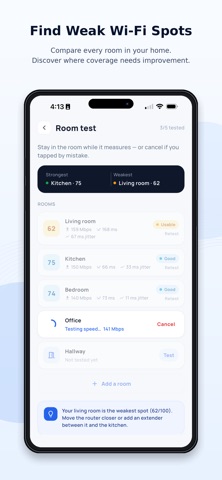
Slow Wi-Fi is usually fixable once you can see what is going on. Wi-Fi Range & Speed Tester measures your internet speed, scores your connection out of 100, and helps you find the rooms where it falls short. Speed test Measure download, upload, ping and jitter. The test opens several parallel connections to a nearby server, so the number reflects what your line can really do rather than one slow stream. A fast way to check you are getting the speed you pay for. Quality score One score out of 100 that combines speed, latency and stability, with a plain-language verdict for streaming, video calls and gaming. If you do not want to read every number, read this one. Room-by-room coverage Test each room and see where the connection is strong and where it weakens. The quickest way to decide where to place the router, or whether an extender is worth buying. Stability test Speed is not everything. This sends a steady stream of checks over time to catch drops, jitter and packet loss, the things that break video calls and games even when the speed looks fine. History and sharing Keep past results to compare rooms and times of day, and share a clean summary whenever you need to. A note for iPhone Apple limits some radio-level tools, such as scanning nearby networks, so this app focuses on the tests that work reliably on iOS: speed, quality, coverage and stability. No account needed. Your history stays on your device. From ACKPlus.
Audience growth
Ratings growth
Baseline captured. Growth appears after the crawler observes a changed rating count.
Momentum comes from crawler snapshots for the tracked storefront. “Viral growth signal” means unusually fast recent rating gains; it is an indicator, not download data.
Price tracking
Price intelligence
First snapshot captured. The trend line starts after the next crawler price observation.
- First observed Aug 19, 2026 · 3:17 PM Free
Screenshots