About this app
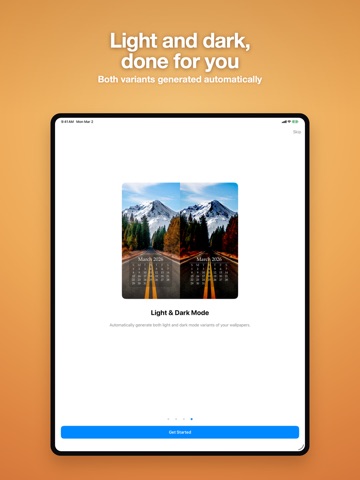
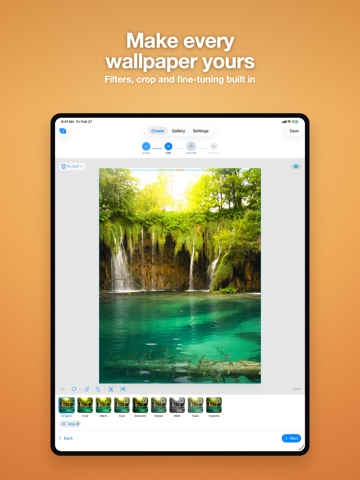
Your month, beautifully displayed. WidgeOne creates custom lock screen wallpapers with integrated monthly calendars for iPhone, iPad, and Mac. Choose from thousands of free photos or use your own, then design a calendar overlay that matches your style. THOUSANDS OF FREE PHOTOS Browse and search stunning photos from Pexels and Pixabay, all built in. Or import your own from your photo library. No separate app or account needed. DEEP CALENDAR CUSTOMIZATION - 20 designed themes: Minimal, Modern, Classic, Seasonal, and Holiday - Full color control for headers, weekdays, weekends, and today highlight - Multiple font families and weight options - Text shadows, outlines, and background effects - Standard, Compact, and Two-Month layouts - Save and sync up to 20 custom themes via iCloud WIDGETS FOR EVERY SCREEN Your calendar doesn't have to live only on your wallpaper. WidgeOne includes 7 widgets to keep your month visible wherever you look. Home Screen (medium and large): - Saved Design, your wallpaper with a live calendar overlay - Clock, digital or analog, with 6 styles, over your wallpaper - Clock + Calendar, time and dates together in one widget - Countdown, days until or since any event you choose Lock Screen (iOS): - Circular, Rectangular, and Inline countdown widgets All widgets are free. No Premium required. ONE DESIGN, EVERY SCREEN Pixel-perfect wallpapers for 24 devices, including iPhone 14 through 17 series, iPhone SE, iPad Pro, iPad Air, iPad, MacBook Pro, and MacBook Air. Smart safe area guides ensure your calendar never hides behind the clock, Dynamic Island, or widgets. DARK MODE Generate automatic or custom dark mode variants. Export both light and dark wallpapers together so your device transitions seamlessly throughout the day. FINE-TUNE YOUR PHOTO Adjust brightness, contrast, and saturation. Apply filter presets such as Vivid, Warm, Cool, Dramatic, Muted, B&W, Fade, and Vignette. Pan, zoom, and crop to frame your image perfectly. DESIGN GALLERY Save up to 5 designs for free, or unlock unlimited with Premium. Tag, favorite, search, sort, duplicate, and batch-manage your collection with iCloud sync. Advance any design to the next month with one tap. EXPORT OPTIONS Export in PNG, JPEG, or HEIF. Save to Photos, Files, or share via AirDrop, Messages, and more. Batch export for multiple devices at once. FREE TO START, PREMIUM TO UNLOCK Download free. Create wallpapers with 3 themes and 3 filters. Upgrade once ($5.99) to unlock all 20 themes, all filters, dark mode, multi-device batch export, and unlimited designs. No subscriptions. No recurring charges. Pay once, yours forever. PRIVACY FIRST No ads. No third-party tracking, analytics SDKs, or ad networks. Your designs stay on your device and in your personal iCloud account. LOCALIZED Full support for English, Japanese, Traditional Chinese, Simplified Chinese, Spanish, French, and German. YOUR MONTH. YOUR SCREEN. YOUR STYLE.
Latest release
What’s New
Your week on the Lock Screen. New Lock Screen calendars Two new widgets for iPhone and iPad. Today shows the date; This Week shows the whole week with today marked. Both are part of Premium. They use the Lock Screen's own monochrome style and sit alongside your wallpaper. The right day, all day Calendar widgets no longer keep highlighting yesterday after midnight. Dark mode Automatic dark versions now generate as intended, and the preview matches what you export. First run in German and French The welcome and photo permission screens now fit at every text size, including the largest accessibility sizes, where the skip control could previously be pushed off screen.
Audience growth
Ratings growth
Baseline captured. Growth appears after the crawler observes a changed rating count.
Momentum comes from crawler snapshots for the tracked storefront. “Viral growth signal” means unusually fast recent rating gains; it is an indicator, not download data.
Price tracking
Price intelligence
First snapshot captured. The trend line starts after the next crawler price observation.
- First observed Sep 17, 2026 · 4:02 AM Free
Screenshots