About this app
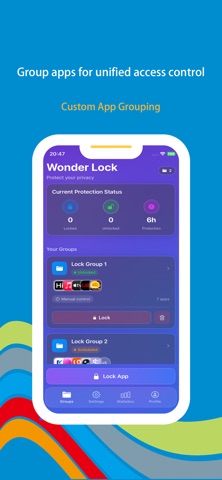
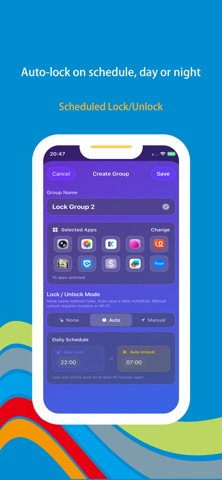
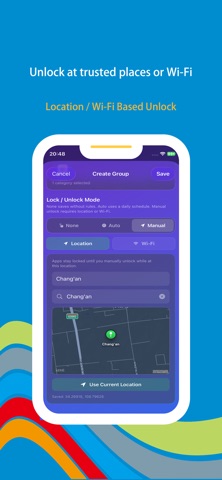
**Wonder Lock** is a professional and efficient app locking and management tool dedicated to providing comprehensive privacy protection and digital wellness services. Unlike traditional app lockers that offer only basic locking functionality, Wonder Lock delivers a complete closed-loop solution encompassing group management, conditional unlocking, system-level protection, and usage analytics, addressing diverse needs including personal privacy protection, family device management, and focus enhancement. **I. Custom Group Management** Wonder Lock allows users to organize apps into custom groups based on usage scenarios or categories, such as social, finance, work, and entertainment, with independent naming and configuration for each group. The grouping feature supports batch operations, enabling users to lock or unlock all apps within a group with a single tap, significantly improving management efficiency. Groups are presented in a card-style layout with drag-and-drop sorting and a clean, intuitive interface, making app organization effortless and visually pleasant. **II. Scheduled Locking and Unlocking** Wonder Lock enables users to set independent scheduled locking and unlocking rules for each group, with different time slots configurable by day to differentiate between workdays and weekends. Once configured, the system automatically executes locking or unlocking at the designated times without manual intervention, ensuring effective distraction blocking during focus hours and restoring normal app access during rest periods. **III. Conditional Unlock Based on Location and Wi-Fi** Wonder Lock allows apps or groups to be unlocked only when specific location or Wi-Fi conditions are met. For example, work apps may only be accessible in the office, while family apps can only be opened at home or on home Wi-Fi. If conditions are not satisfied, the apps remain locked. This mechanism ties access rights to environmental context, enabling security levels to adapt dynamically to different scenarios, making it ideal for enterprise management, parental controls, and shared-device use. **IV. System-Level Restrictions** Wonder Lock provides system-level app behavior management capabilities, effectively preventing apps from being deleted by others and blocking unauthorized installations of new apps. This feature is especially valuable for parental control over children's device usage, enterprise management of corporate terminals, and security maintenance of shared devices, establishing a solid security defense from the system level and eliminating privacy breaches and device security risks caused by accidental operations or malicious actions. **V. App Usage Monitoring and Analytics** Wonder Lock incorporates an app usage tracking module that accurately records the usage duration, launch frequency, and active time distribution for each app. Statistics are presented through intuitive charts with daily and weekly views, helping users gain a comprehensive understanding of their digital habits. Based on analytical insights, users can make targeted adjustments to their usage behavior, optimize time allocation, and progressively cultivate healthier, more self-disciplined smartphone habits. **Subscription Service** When you subscribe to the "VIP Subscription" service, you will enjoy the following benefits: 1. Unrestricted access to all features. 2. AI recommendations based on usage habits. Payment for subscriptions is straightforward—the user's iTunes account is credited immediately after confirmation of purchase and payment. Please note that the Apple iTunes account will be automatically debited 24 hours prior to expiration. Upon successful deduction, the subscription term will be extended by one subscription cycle. User Agreement: https://www.wonderda.com/agreement.html Privacy Agreement: https://www.wonderda.com/privacy.html **Wonder Lock** — Dedicated to privacy protection and digital wellness.
Latest release
What’s New
Thanks for staying with us! In this version, you'll find: 1. UI Redesign 2. Add System-Level Restrictions 3. Fix bugs
Audience growth
Ratings growth
Baseline captured. Growth appears after the crawler observes a changed rating count.
Momentum comes from crawler snapshots for the tracked storefront. “Viral growth signal” means unusually fast recent rating gains; it is an indicator, not download data.
Price tracking
Price intelligence
First snapshot captured. The trend line starts after the next crawler price observation.
- First observed Aug 10, 2026 · 7:56 AM Free
Screenshots