About this app
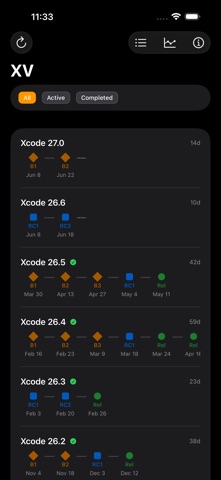
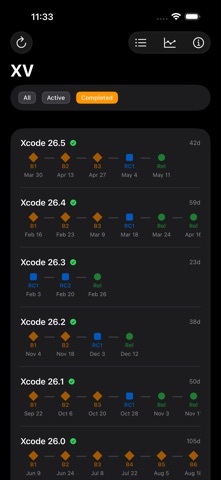
XV: Release Radar gives you instant access to every Xcode release Apple has ever shipped — from the latest betas to the very first version. Key Features: • Browse all Xcode releases, betas, release candidates, and developer previews in one place • Compare any two releases side by side to see what changed — SDKs, compilers, and requirements • Release Timeline — follow each version's journey from first beta to final release, and filter by completion status to view active or completed cycles • Toolchain History — discover when each Swift and platform SDK version first shipped • Cadence Chart — visualize the days between consecutive Swift and SDK releases to spot release velocity trends • Watching — pin the releases you track and see at a glance when a newer version is available • Opt-in release notifications by type: betas, release candidates, stable releases, and developer previews • View detailed SDK versions for iOS, macOS, tvOS, watchOS, and visionOS • Check Swift and Clang compiler versions included in each release • Copy a CI Matrix snippet — the exact Swift, Clang, SDK, and macOS requirement versions, ready to paste into CI config • Filter by release type and search by version number, SDK, or compiler • Download Xcode directly from Apple with one tap • Share a release as text or a rendered image card, and copy download links instantly • Verify downloads with SHA-1 checksums • Ask Siri or use the Shortcuts app to get the latest Xcode, identify a build number, find the first Xcode to ship a given Swift or SDK version, or check which Xcode runs on your macOS — and find any release from Spotlight • On Mac, a menu bar extra puts the latest releases, notifications, and download links one click away • Home Screen and desktop widgets for at-a-glance release info • Works offline with cached data • Native app for iPhone, iPad, and Mac — no web browser needed • Localized in dozens of languages • Full VoiceOver, Dynamic Type, and Reduce Motion support Built for developers who need to quickly look up which SDK ships with which Xcode, find download links, or check compiler versions. Whether you're maintaining an older project or staying on the cutting edge with the latest beta, XV has you covered. Accessibility is a priority — XV is designed to work great with VoiceOver, supports Dynamic Type for comfortable reading at any text size, and respects Reduce Motion preferences. Data provided by xcodereleases.com — the trusted community resource for Xcode release information.
Latest release
What’s New
What's new in this update: • Compare any two releases side by side — SDKs, compilers, and requirements • Release Timeline — follow each version from first beta to final release, and filter by active or completed cycles • Toolchain History & Cadence Chart — see when each Swift and SDK version first shipped, and the gaps between them • Watching — pin the releases you care about and see at a glance when a newer version is available • Release notifications — opt in by type: developer previews, betas, release candidates, and stable releases • Copy a CI Matrix — the exact Swift, Clang, and SDK versions, ready to paste into your CI config • Share a release as text or a polished image card, and copy download links in a tap • Spotlight — find any Xcode release right from your Home Screen • More Siri & Shortcuts — identify a build, look up the first Xcode to ship a Swift or SDK version, or find which Xcode runs on a given macOS version Thanks for using XV! Data from xcodereleases.com.
Audience growth
Ratings growth
Baseline captured. Growth appears after the crawler observes a changed rating count.
Momentum comes from crawler snapshots for the tracked storefront. “Viral growth signal” means unusually fast recent rating gains; it is an indicator, not download data.
Price tracking
Price intelligence
First snapshot captured. The trend line starts after the next crawler price observation.
- First observed Aug 8, 2026 · 2:44 PM Free
Screenshots