About this app
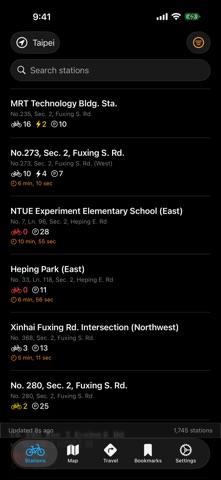
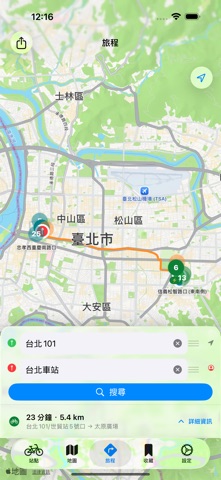
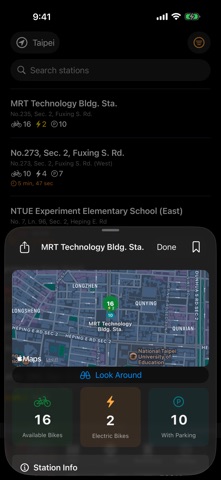
You stop at the corner. Not sure which way. The watch glows— northeast, four hundred meters, bikes waiting. That's how it starts. — Apple Watch Raise your wrist. Station, distance, direction. Tap the map. Everything nearby. iOS App Station list, map, bookmarks, settings. Every bike in the city. Home Screen Widgets The nearest station without opening the app. Journey Planning Enter your destination. Find the pickup station, the drop-off, every minute of walking in between. Bookmarks The stops you return to. Blue — on your Watch, your phone, your widget. Offline Data No signal. Still works. Auto City Switching Taipei. New Taipei. Taoyuan. Taichung. Tainan. Kaohsiung. More. You move, it follows. Filter & Sort Bikes available. Docks open. Nearest first. Always sorted. Color at a glance Green is plenty. Red is gone. You know before you walk there. The wheels turn. The city moves.
Latest release
What’s New
What's New in YouBike 3.14 She opened Settings to find the coffee link. It wasn't there last week — now it sat near the top, next to Remove Ads and the support links. Someone had tidied things up. She tapped Buy Me a Coffee, sent a small thanks, and went back to the map. The station count read "3 bikes." Clear and plain. It always should have said that.
Audience growth
Ratings growth
Baseline captured. Growth appears after the crawler observes a changed rating count.
Momentum comes from crawler snapshots for the tracked storefront. “Viral growth signal” means unusually fast recent rating gains; it is an indicator, not download data.
Price tracking
Price intelligence
First snapshot captured. The trend line starts after the next crawler price observation.
- First observed Aug 19, 2026 · 7:42 PM Free
Screenshots