About this app
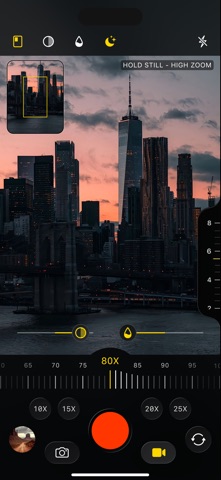
Use your phone camera like digital binoculars with high zoom, live contrast, saturation, and light adjustment tools. Zoom Boost: Multifunction Binoculars turns your phone camera into a powerful digital zoom tool for observing distant objects, landscapes, buildings, roads, nature, and outdoor scenes. The app gives you a clean camera interface with high zoom control, photo and video recording, a zoom preview window, and real-time image adjustment tools. You can increase contrast, adjust color saturation, improve low-light visibility, and keep better control of the frame while using strong zoom. Main features: - High Zoom Camera Zoom in on distant objects and capture photos or videos directly from the app. - Zoom Preview Window A small overview window shows the full frame and highlights the area where you are zoomed in, making high zoom easier to control. - Contrast Control Adjust image contrast in real time to make details clearer. - Saturation Control Change color intensity while viewing or recording. - Light Amplifier Brightens the image in dark or low-light scenes to improve visibility. This is not infrared night vision and does not work in complete darkness. - Photo & Video Recording Take pictures or record video with your selected zoom and image settings. - Hold Still Reminder At high zoom levels, the app reminds you to keep the phone steady for a clearer image. Designed for: - Outdoor observation, travel, city views, landscapes, nature, distant buildings, road scenes, and everyday zoom camera use. Important note: Zoom quality depends on your phone camera, lighting conditions, hand stability, and distance to the object. The app uses digital zoom and image processing; it is not a professional optical binocular or infrared night vision device.
Latest release
What’s New
- Bug fixes and performance improvements
Audience growth
Ratings growth
Baseline captured. Growth appears after the crawler observes a changed rating count.
Momentum comes from crawler snapshots for the tracked storefront. “Viral growth signal” means unusually fast recent rating gains; it is an indicator, not download data.
Price tracking
Price intelligence
First snapshot captured. The trend line starts after the next crawler price observation.
- First observed Aug 20, 2026 · 1:46 AM Free
Screenshots