About this app
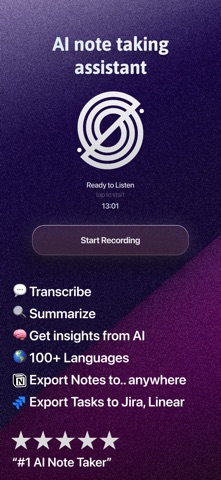
Spellar AI — Professional Note Taker used by founders, investors, and managers. Featuring full synchronization across iOS, iPadOS, Web, and macOS. Focus on the negotiation, not data entry. Spellar AI provides seamless transcription and conversation analysis, turning audio into structured business assets. Launch the app and start a session — Spellar automatically recognizes context, highlights key points, and generates a professional summary with a clear action plan. ACCESS TO ADVANCED LLMs • Multi-model Architecture: Select your data processing engine from market leaders — Gemini, GPT, Claude, and Perplexity. • Task Optimization: Switch models based on meeting specifics to achieve maximum result relevance. • Deep Analysis: Technology ensures high-precision understanding of context and technical terminology. AI COPILOT: REAL-TIME ASSISTANT • Interactive Engagement: Ask the AI questions directly during the meeting to clarify details or retrieve instant information. • Specialized Modes & Commands: Use distinct Copilot "modes" and voice/text commands to steer the analysis and assistance in real-time. • Active Support: Copilot acts as a digital assistant, helping you moderate the meeting and maintain focus on what matters. MEETING PREP NOTES • Walk in Ready: Jot down your agenda, talking points, and links right on a calendar event before the meeting starts. • Always at Hand: Your prep appears beside Copilot the moment you start recording — with clickable links and checklist formatting. • Synced Everywhere: Notes sync across your Apple devices and the Web, even when written offline. FLEXIBLE REPORT CUSTOMIZATION • Adaptive Templates: Customize summary structures for specific event types — from daily stand-ups to strategic sessions. • Format Builder: Utilize professional templates and configure your own logic for summary display to standardize reporting. AUTOMATION & INTEGRATIONS • Efficient Workflows: Tools to build complex workflows that convert text into action. • Task Export: Direct integration with project management systems to automatically create Action Items based on agreements. UNIFIED ECOSYSTEM • Seamless Synchronization: Start recording on mobile and continue working on the text via desktop. • Centralized Storage: All recordings, transcriptions, and analytics are securely stored and accessible across all your Apple devices (iOS, iPadOS, macOS) and the Web. • Focus on Communication: Technology allows you to completely eliminate manual note-taking during negotiations. How it Works: • Sync your calendar for automatic meeting detection. • Start a new recording session via the app on iPhone, iPad, or Mac. • Select the required AI model and, if needed, use Copilot for assistance. • Conduct the meeting while using Copilot commands for real-time insights. • Receive a structured document and export tasks to your task manager. "True Value" Monetization Model: We adhere to principles of transparent pricing. Subscription costs reflect the product's real value — saved work hours and increased business process efficiency, with no hidden fees. Optimize your meetings with Spellar AI today. Please access the following links to our essential policy documents • Terms of Subscription: https://spellar.ai/terms-of-subscription • Privacy Policy: https://spellar.ai/privacy • AI Usage Policy: https://spellar.ai/ai-usage-policy • Contact us: support@spellar.ai
Latest release
What’s New
Spellar 3.3.1 makes your recordings more reliable than ever — nothing gets lost, even if your Mac crashes mid-meeting. New & Improved: • Recordings now survive a crash, force-quit, or accidental exit — audio is recovered automatically when you reopen Spellar. • Play your local recordings even when cloud audio has expired — Spellar falls back to the copy saved on your device. • Recordings are saved locally by default, with readable file names and a new "Clear Local Audio" button to free up disk space. • See at a glance where each recording came from with new source icons (Mac, iPhone, or browser). • ⌘Q now asks before quitting during a recording, so you never lose a session by accident. Under the Hood: • More accurate, more reliable transcripts — fewer dropped first words, no more real speech mistaken for silence, and stronger on-device transcription. • Outlook recurring meetings now sync correctly to your calendar. • Dozens of fixes across AI Chat, sign-out, the recordings list, prep notes, and the onboarding walkthrough.
Audience growth
Ratings growth
Baseline captured. Growth appears after the crawler observes a changed rating count.
Momentum comes from crawler snapshots for the tracked storefront. “Viral growth signal” means unusually fast recent rating gains; it is an indicator, not download data.
Price tracking
Price intelligence
- First observed Aug 1, 2026 · 1:25 PM Free
Screenshots