About this app
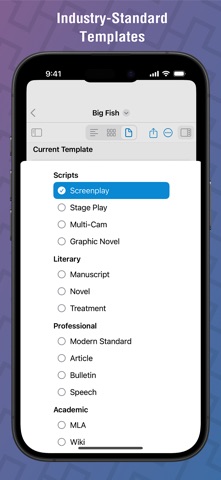
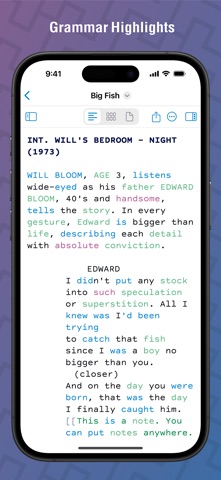
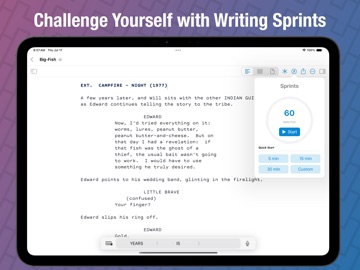
Highland Pro is a better screenwriting app — one you’ll want to use for everything you write. Highland’s clean design and innovative writing tools help you focus on your story, not formatting. With full support for Mac, iPad, and iPhone, you can write scripts, screenplays, and novels anytime, anywhere. “Highland is just a cleaner, purer way to be creative.” — Phil Lord, Writer/Director of The Lego Movie, 21 & 22 Jump Street . . . . . F E A T U R E S . . . . . Created by screenwriter and novelist John August, Highland Pro is built by writers, for writers. Its distraction-free tools help you get things written: •/Lookup. (NEW!) Get quick answers — definitions, rhymes, world facts — without leaving your draft. •The Shelf. (NEW!) Store snippets, notes, and ideas. Afraid to cut dialogue? Save it while you write. •Title Page Builder. (NEW!) Build professional title pages that meet script formatting standards. •Custom Pages. (NEW!) Add prefaces, cast lists, or production breakdowns to any screenplay or script. •Overview. (NEW!) See your entire screenplay, script, or novel in one view. Highlight characters, scenes, and more. •Grammar Highlight. (NEW!) Strengthen writing by exploring nouns, verbs, adjectives, and adverbs in your document. •The Navigator. (Improved!) Track your story’s structure — what you’ve written and what’s next. •Headers and Footers. (Improved!) Add custom headers and footers to your script or draft. •Templates. (Improved!) Choose from 14 writing templates, including Screenplay, Multi-Cam, and Manuscript. •Themes. (Improved!) Customize your writing environment with 12 themes or build your own. •Revision Mode. Track changes with color and margin stars. •Writing Sprints. Boost output with timed, focused writing sessions. •Full Screen Mode. Create in a clean, distraction-free environment. •In-line Notes & Synopses. Keep beats and screenplay notes inside your draft. . . . . . S C R E E N W R I T E R S . . . . . Highland Pro is made for screenwriters working on film, TV, or any professional writing project. •Compatibility. Import/export Fountain, Final Draft (.fdx), and PDFs, perfect for studio workflows. •Autocomplete. Type faster with smart suggestions for character names and scene headers. •Character Highlighting. Organize characters visually in the writing interface and exports. •Gender Analysis. Analyze gender representation across your script or novel. •Scene Numbering. Automatic scene numbering, including custom ranges, essential for professional scripts. •PDF Melting. Highland’s exclusive tool “melts” Final Draft and Fountain PDFs for full editing. . . . . . A D V A N T A G E S . . . . . Highland Pro is built for today’s professional writers, whether writing a first screenplay or polishing a production draft. •Excellent Performance. From scrolling to previews, Highland is fast, using native Apple technologies. •Great Typography. Beautiful, readable fonts optimized for screenwriting and long-form writing. •Standards-Leading. From the creators of Fountain, Highland speaks Fountain and Markdown fluently. . . . . . S U B S C R I P T I O N . . . . . After a free 30-day trial, your subscription unlocks ALL FEATURES and supports Highland’s development. If your subscription lapses, Highland Pro still opens, prints, and exports documents in compatible formats. You’re never locked in. . . . . . S U P P O R T . . . . . The in-app “Welcome to Highland” tutorial walks you through the features. We also have an extensive FAQ available in-app and online: http://quoteunquoteapps.com Questions? Use the Help menu or email: support@quoteunquoteapps.com . . . . .P R I V A C Y . . . . . We’re fully committed to respecting your privacy and your content. For details, visit:https://support.quoteunquoteapps.com/privacy-policy . . . . . E U L A . . . . . https://www.apple.com/legal/internet-services/itunes/dev/stdeula/
Latest release
What’s New
- Pin items to the top of the Shelf, rearrange your pins, and unpin to send an item back to where it was - Number paragraphs on macOS, shown both in the editor margin and in exported PDFs. Choose All Paragraphs, Dialogue Blocks (one number per block, on the character cue), or None. The setting is saved with each document. - In the Characters list, hide a character's highlight without losing its color. Click the eye button on any row to toggle it back, or use the new Show All and Hide All buttons - When iCloud downloads a newer version of an open document, Highland now backs up your unsaved edits and asks whether to keep or discard them, instead of silently reloading - Your revision colors now show up when you Fling a document for others to read - Fling comment cards now work fully with VoiceOver, including the Delete, Resolve, and jump-to-quote buttons - PDFs exported on iOS now have working links. In the Table of Contents, in endnotes, and to external web pages - Fixed two rare sync conflict bugs that could discard your edits. One on iOS when a conflicting version failed to open, and one on macOS that stopped the app from noticing later iCloud changes - Fixed a freeze caused by very high-resolution title-page images when viewing, previewing, exporting, or deleting the title page - Fixed the editor's page break indicator landing in the wrong spot when a dialogue block splits across pages - Fixed the text cursor on blank lines sitting to the left of the margin after reopening a document or resizing the editor - Fixed custom-page boxes, headers, and footers ignoring left-align and blockquote formatting - Fixed iPad exports using a generic file name, or an old name after the document was renamed, instead of the document's current name - Fixed undo history being lost after entering Preview on iPad - Fixed the Revisions and Sprint toolbar icons not lighting up on macOS 26, including when opening a document that already has revisions or a running sprint - Fixed revision colors and toolbar icons not updating when switching between Light and Dark modes on macOS - Fixed the toolbar sometimes disappearing with no way to bring it back - Fixed the toolbar reverting to Icon and Text in every new window after setting it to Icon Only on macOS - Fixed display glitches in the Navigator when using window tabs or full screen - Fixed the launch window opening at the wrong size and off-center on macOS 26 - Lined up the utility toolbar item widths on macOS 26 - Crash fixes
Audience growth
Ratings growth
Baseline captured. Growth appears after the crawler observes a changed rating count.
Momentum comes from crawler snapshots for the tracked storefront. “Viral growth signal” means unusually fast recent rating gains; it is an indicator, not download data.
Price tracking
Price intelligence
- First observed Aug 1, 2026 · 9:35 AM Free
Screenshots
16 screenshots · scroll for more