About this app
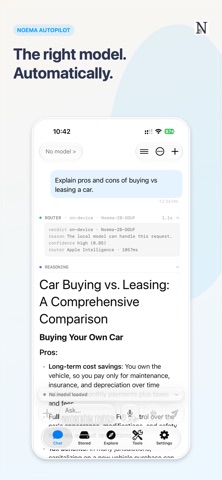
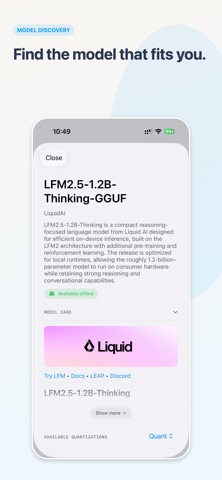
Noema brings large language model intelligence to all your devices, fully offline. Download lightweight models directly from Hugging Face, connect supported remote endpoints, and pair models with curated textbooks and your own PDFs or EPUBs. The privacy-first design means your data never leaves your device when running locally, whether you are on iPhone, Mac, or visionOS. - Native macOS app: Run the full Noema experience on your desktop with a rebuilt interface that feels at home on macOS. - visionOS support: Use Noema in spatial computing environments, with windows you can place around your workspace. - Noema Relay: Connect your iPhone to your Mac via CloudKit, with no local Wi-Fi required, so one device can host a model while another becomes the client. - Vision support for models: Attach photographs to your prompts and use multimodal models for on-device image understanding and analysis. - Open Textbook Library integration: Browse and import entire textbooks through the built-in Explore view; Noema indexes them locally so you can search and retrieve relevant passages on demand. - Bring your own data: Add personal documents in PDF or EPUB formats, which are embedded and indexed on-device to power retrieval-augmented generation. - Integrated Hugging Face search: Discover and install quantized models from the Hugging Face Hub with one-tap installation, automatic dependency management, and real-time download progress. - Remote model support: Connect to supported remote endpoints including OpenRouter and LM Studio, with updated LM Studio REST v1 compatibility and a smoother model download flow through Explore. - Expanded model runtime support: Run models across GGUF, MLX, ExecuTorch, CoreML, and Apple Foundation Model support, giving you flexible on-device options across Apple hardware. - RAM check and model size helper: A built-in advisor estimates each model’s memory footprint and shows when it fits your device’s budget; it can also estimate the maximum context length that fits in RAM. - Advanced settings for power users: Fine-tune context length, quantization, and GPU acceleration; enable tool calling for built-in search and other functions; and customize model parameters for optimal performance. - Built-in tool calling and Python support: Use integrated tools, including Python, to extend model capabilities for more advanced workflows. - Built-in search and RAG: Use integrated search tools and retrieval-augmented generation to query your data without hitting context limits. - Localization upgrades: Experience Noema in 10 languages, so international teams can work in the interface that suits them best. - Private and offline by default: Local models run entirely on-device, and your conversations and files stay on your device unless you choose to use a connected remote provider.
Latest release
What’s New
• Constellation: use your Mac's models from your iPhone, iPad, or Vision Pro. Any Mac on your iCloud account with Remote Access turned on is found on its own — no address or token to enter — and tapping Use opens the chat right away while the Mac loads in the background. • Noema picks the most private way to reach your Mac for each message, from your local network through to an encrypted relay, and shows which one it is using in the chat header. Off-grid Mode now holds across every kind of connection, not just ordinary web traffic. • Your Mac can stand in for the cloud: its models appear in Autopilot's Stronger Model picker, and a new Fallback Model means a hard question tries another model before your on-device one answers. • Chats sync across your Apple devices if you want them to — one switch, off by default, in a new Sync & Devices setting. Conversations, bookmarks, and per-chat settings travel through your private iCloud account, and a reply that finishes on your Mac appears on your phone without opening the app. • Projects group related chats under shared instructions and sources, so every conversation in a project starts from the same context. Import PDFs, EPUBs, and text files straight into a project, or attach datasets you already have. • A rebuilt chat drawer brings search, projects, bookmarks, favorites, and date groups into one list with a preview of the last reply on every row, and chats stay noticeably faster during long generations. • Images you attach now reach the model at full resolution instead of being shrunk on the way in, so screenshots, receipts, and dense charts are legible to it for the first time. • Paged Overfit models run with the context you choose instead of a hidden cap, and Laguna S 2.1 now works as a Paged model. • Models are more honest about what they can do: a vision model that cannot actually read images no longer claims it can, and downloaded models use the Chat Template they shipped with. • On Mac, the Relay page is replaced by a simpler Developer page, and Remote Access has moved into Settings, under Sync & Devices. • Interface fixes, bug fixes, and polish throughout.
Audience growth
Ratings growth
Momentum comes from crawler snapshots for the tracked storefront. “Viral growth signal” means unusually fast recent rating gains; it is an indicator, not download data.
Price tracking
Price intelligence
- First observed Aug 1, 2026 · 1:32 PM Free
Screenshots