About this app
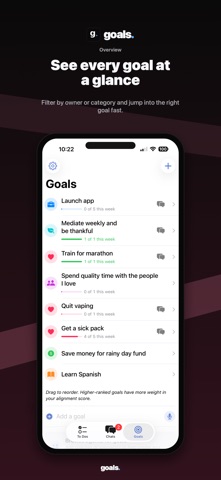
goals. is the AI To Do planner that turns goals into working systems. Capture what is on your mind by voice or text. goals. helps turn messy ideas into structured To Dos, links each task to the bigger goal it supports, and keeps momentum moving with friends, teammates, and AI agents. Use goals. to: - Capture ideas, plans, and loose thoughts by voice or text. - Turn messy inputs into clear goals and To Dos with Keen. - Connect every To Do to the goal it moves forward. - Plan solo goals or shared goals with friends and collaborators. - Assign To Dos to yourself, other people, or AI agents. - Open goal chats to coordinate work and decisions. - Ask Keen what to do next when the list gets crowded. - Get catch-ups, standups, stale-work nudges, and suggested next steps. - Review whether your week matched what mattered. Keen is your goal companion inside the app. It can help plan a goal, summarize what changed in a shared goal chat, notice stale work, draft next steps, and keep the next useful To Do in front of you. goals. is built for real life: ambitious goals, recurring work, quick voice capture, shared projects, group chats, and the moments when you need help turning intention into action. Goals into working systems. PRICING & SUBSCRIPTION goals. is free to try for 30 days, with full access to every feature. After the trial, creating new To Dos, goals, and voice entries requires a goals. Plus subscription. Reading and exporting your existing data remains free forever. Your account simply becomes read-only, and you can return any time by subscribing. Subscription options: • goals. Plus (Monthly) — $7.99 USD per month • goals. Plus (Yearly) — $59.99 USD per year (about $4.99 per month, best value) Payment will be charged to your Apple ID account at confirmation of purchase. Subscriptions automatically renew unless auto-renew is turned off at least 24 hours before the end of the current period. Your account will be charged for renewal within 24 hours prior to the end of the current period at the price of the plan you selected. You can manage your subscription and turn off auto-renewal at any time by going to your Account Settings on the App Store after purchase. Any unused portion of a free trial period will be forfeited when you purchase a goals. Plus subscription. Privacy Policy: https://trygoals.app/privacy Terms of Use: https://trygoals.app/terms
Latest release
What’s New
Goals 1.2.4 teaches quick add your shorthand and gives board meetings a voice. - Goal keywords: add trigger words to a goal ("gym", "leg day") and quick-added To Dos containing them file there automatically — a chip shows where they're headed before you commit. - Speaker separation (beta) labels who said what when a room shares one microphone. - Chats open faster, sending no longer hitches, and replies fade in more gently. - Cleaner goal pages, one-line goal rows, and a much smaller download.
Audience growth
Ratings growth
Baseline captured. Growth appears after the crawler observes a changed rating count.
Momentum comes from crawler snapshots for the tracked storefront. “Viral growth signal” means unusually fast recent rating gains; it is an indicator, not download data.
Price tracking
Price intelligence
First snapshot captured. The trend line starts after the next crawler price observation.
- First observed Aug 1, 2026 · 1:26 PM Free
Screenshots