About this app
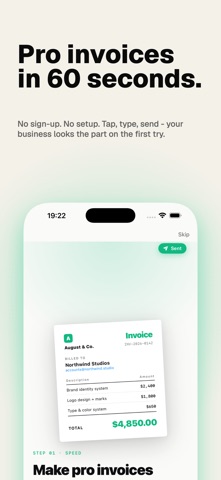
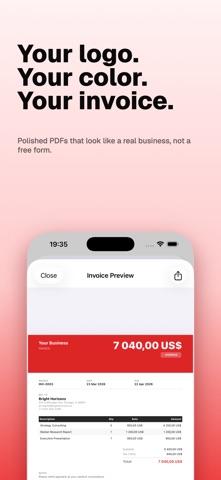
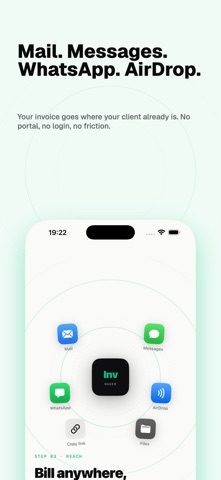
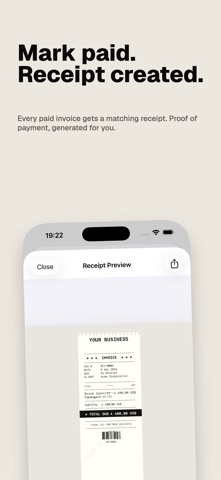
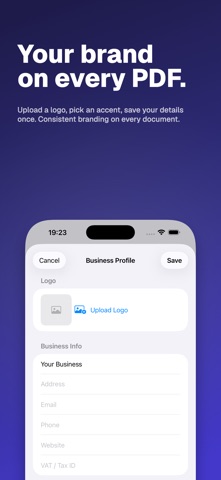
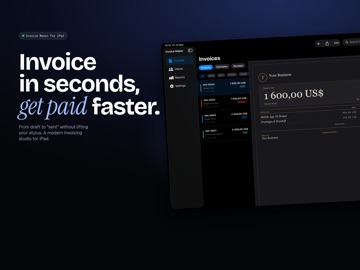
Send a professional invoice from your iPhone, iPad, or Mac in about a minute. No sign-up, no bookkeeping setup, and you can start for free. Pick a client, add what you did, tap send. They get a clean PDF by email or message, and you get back to actual work. WHO USES IT • Freelancers like designers, developers, writers, translators, and consultants. • Photographers, tutors, trainers, and coaches who work for themselves. • Trades such as plumbers, electricians, handymen, cleaners, and landscapers. • Small business owners and people running a side hustle. • Basically, anyone who needs to bill a client and doesn't want the overhead of QuickBooks. KEY FEATURES INVOICE GENERATOR • Build a full invoice in under a minute. Add line items with quantity, rate, and tax, apply a discount, set a due date. Every invoice is numbered automatically (INV-001, INV-002, and so on). ESTIMATE & QUOTE MAKER • Send a quote before the job starts. When the work is done, turn that estimate into a finished invoice with a single tap. RECEIPT GENERATOR • Mark an invoice as paid and a matching receipt is created for you. Handy when a client needs proof of payment for their own records. PDF TEMPLATES • Nine designs to choose from: Classic, Modern, Minimal, Bold, Editorial, Noir, Brutalist, Ledger, and Receipt. Add your logo and set an accent color so every invoice looks distinctly yours. CLIENT DIRECTORY • Save a client once and reuse them on every invoice. Name, address, email, VAT or tax ID, payment terms. It all lives on your device. MULTI-CURRENCY & TAXES • Over 150 currencies are supported. Handle VAT, GST, sales tax, and more than one tax rate on a single invoice. Works the same whether you bill in USD, EUR, GBP, AUD, or something else. RECURRING INVOICES • Got a monthly retainer or a repeating bill? Set it up once and it generates on schedule. ITEM CATALOG • Save the products and services you sell with their prices, then drop them into any invoice in one tap. SEND ANYWHERE • Share the PDF by email, Messages, WhatsApp, or AirDrop, or just save it to Files. There's no portal your client has to sign into. REPORTS & CSV EXPORT • See your totals at a glance: paid, outstanding, overdue. Export the whole history as a CSV when it's time to hand things to your accountant or do your taxes. iCLOUD SYNC • Start an invoice on your iPhone and finish it on your iPad or Mac. Everything syncs through your own iCloud, so it never touches our servers. THE IDEA Most invoicing apps try to grow into full accounting suites. This one doesn't. It makes a good-looking PDF invoice, sends it, and tracks whether you got paid. That's it. There's nothing to set up before you can send your first bill. No account, no client portal, no fee just to email a PDF. If you've outgrown billing from a spreadsheet but a full accounting platform is more than you need, this sits right in between. FREE & PRO The free version gives you 5 invoices, estimates, or receipts a month, the Classic template, the client directory, and full currency and tax support. Pro removes the limits and adds the rest: - Unlimited invoices, estimates, and receipts - Every template, plus logo and color branding - No watermark on your PDFs - Recurring invoices - Item catalog - CSV export Subscription Terms: Payment charged to iTunes Account. Auto-renews unless disabled 24 hours before period ends. Manage in Account Settings. https://www.apple.com/legal/internet-services/itunes/dev/stdeula/ YOUR DATA STAYS YOURS Invoices live on your device and sync through your private iCloud, which we have no way to read. There are no servers of ours holding your billing data, no analytics watching your clients, and nobody else getting access. Download it free and send your first invoice today. If you want the full set, the trial runs a week and you can cancel anytime.
Latest release
What’s New
Reliable iCloud sync • Your invoices, clients, and business details now stay in step across iPhone, iPad, and Mac. Your company information no longer drifts between devices, and recurring invoices are created once per period no matter how many devices you work from. Choose your paper size • Invoice Defaults now has a PDF paper size setting: Automatic, A4, or US Letter. Automatic follows your region, so set it explicitly when you bill clients abroad. Sharper PDFs • Long invoices repeat their column headers on every page, so a second page still reads like an invoice. Notes and payment terms print in full instead of stopping at the page edge. • Multi-line business and client addresses lay out cleanly. Tax lines show the rate you actually charged, and say "mixed rates" when items are taxed differently. • The Receipt Tape template now prints your notes. Payments you can take back • Recorded a payment by mistake? Swipe it away in Record Payment. The invoice status follows the remaining balance on its own, so an invoice that is no longer settled goes back to unpaid instead of staying marked as paid. Scan, review, then save • Scanning an invoice now opens a filled-in draft for you to checkfirst. Nothing is written to your records until you tap Save, so backing out leaves no stray invoices or clients behind. Also in this release • Your invoice list is ordered by invoice date rather than by when the invoice happened to be created. And if iCloud is ever unreachable, the app keeps working with your data safely on this device.
Audience growth
Ratings growth
Baseline captured. Growth appears after the crawler observes a changed rating count.
Momentum comes from crawler snapshots for the tracked storefront. “Viral growth signal” means unusually fast recent rating gains; it is an indicator, not download data.
Price tracking
Price intelligence
First snapshot captured. The trend line starts after the next crawler price observation.
- First observed Aug 1, 2026 · 1:31 PM Free
Screenshots